

Solidres 4.6.0 is out, and most of it is for the people who run a property day to day. The property's edit screen is rebuilt in plain words: seven tabs made of sections, a label on every setting that says what it does and a line of help under it, in all 25 languages.
With Experience 2.4.0, guests can add a tour to their stay in the property's booking form and pay for both at once. A public booking API, off until you switch it on, lets other websites, apps and AI assistants find a free room, price it exactly as your booking form does and book it. And with Rate Plan 1.2.0, last year's prices fill next year's empty days in one save.
Complex Tariff and Statistics are gone, as announced with 4.5.0: the update moves a site onto Rate Plan, Front Desk and Dashboard, which use the same data. The release also charges extras priced per night or per person correctly again, and closes the files attached to reservation notes to the web, so we recommend updating.
A property screen in plain words
The property screen used to be a long row of tabs named after the way Solidres stores things, with its help hidden until you switched on the toolbar's help toggle. In 4.6.0 the settings are arranged by what they are about, in seven tabs, and each tab opens with a sentence saying what it holds:
| Tab | What it holds |
|---|---|
| Details | What your property is, where it is and how guests reach you |
| Photos | Photos of the property and its logo |
| Policies & facilities | Your house rules and what the property offers, as guests read them on the property page |
| Property page | How the property page looks and what guests can do on it |
| Booking | How guests book, what they can change afterwards and who gets the emails |
| Pricing & payments | How prices are worked out, the deposit, and how guests pay |
| Publishing | Where the property appears: your site's menu, search engines and other websites |
Team, Channel Manager, Integrations and Activity appear when an add-on puts something in them. Each tab is made of sections with headings, and every setting has a label that says what it does and one line of help under it, always shown. Two questions replace five switches: When guests book asks whether guests need an account, and How the deposit is worked out offers a percentage of the total, a fixed amount or the cost of the first nights. A setting whose add-on or option is off stays out of sight until it is on, and keeps its value. No setting was removed, and nothing you saved changes.
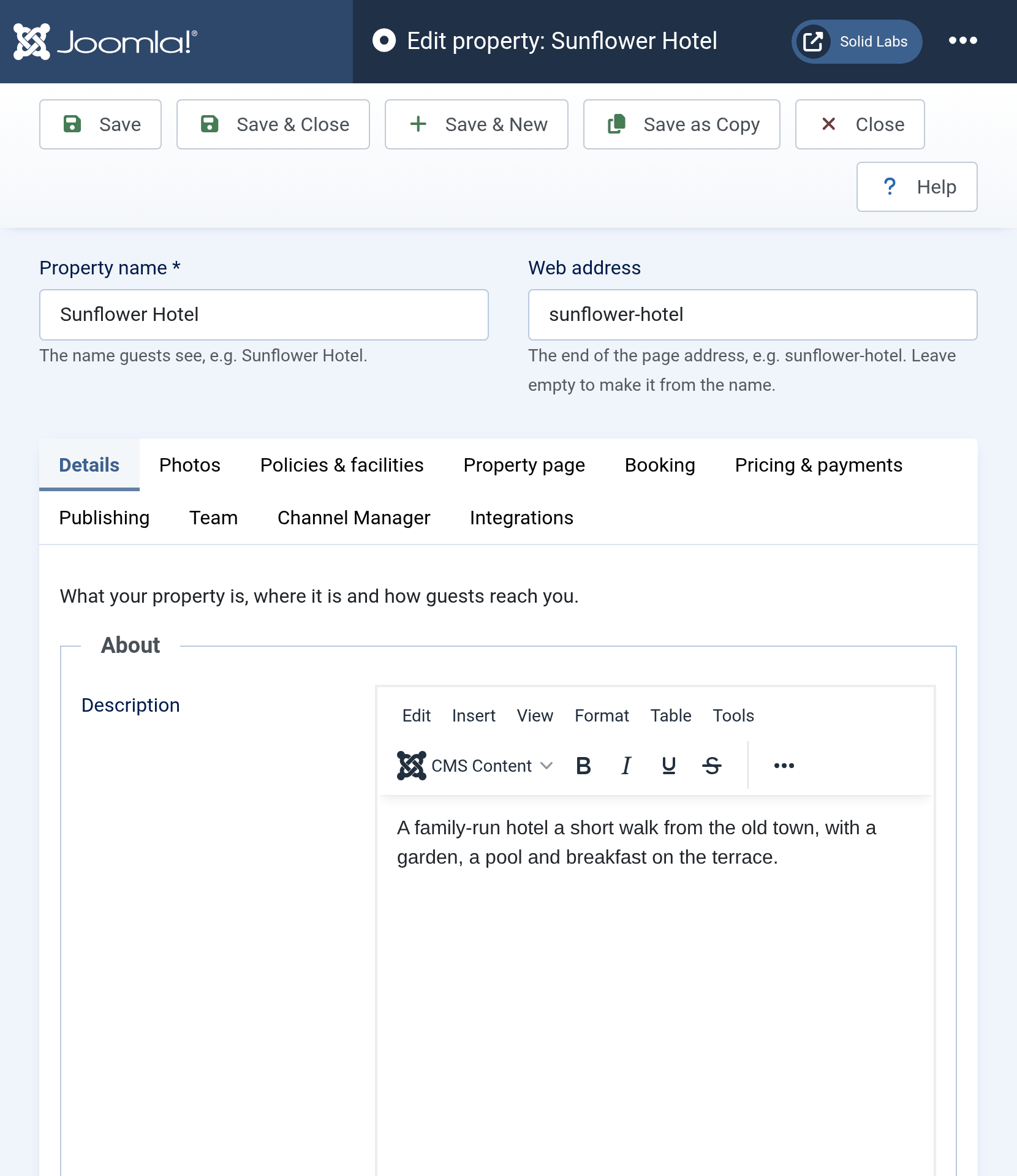
A new property can now be saved from its first tab: fill in Details, save, and the first payment method turned on becomes its default. The toolbar's Help button opens Setting up a property, which goes through the tabs and lists where each setting of the old tabs went. With Hub 2.4.1, partners get the same tabs for their own properties, without the settings only an administrator sets.
Tours booked with the stay
A guest who books a room is often looking for something to do while they are there. With Experience 2.4.0, choose the properties a tour belongs to in its Associated accommodation field, and guests booking a room at one of them see a Tours and activities for your stay panel on the guest step: for each tour, a date during the stay, a time when the tour has time slots, the number of adults and children, the tour's extras and the price, updated as they choose.
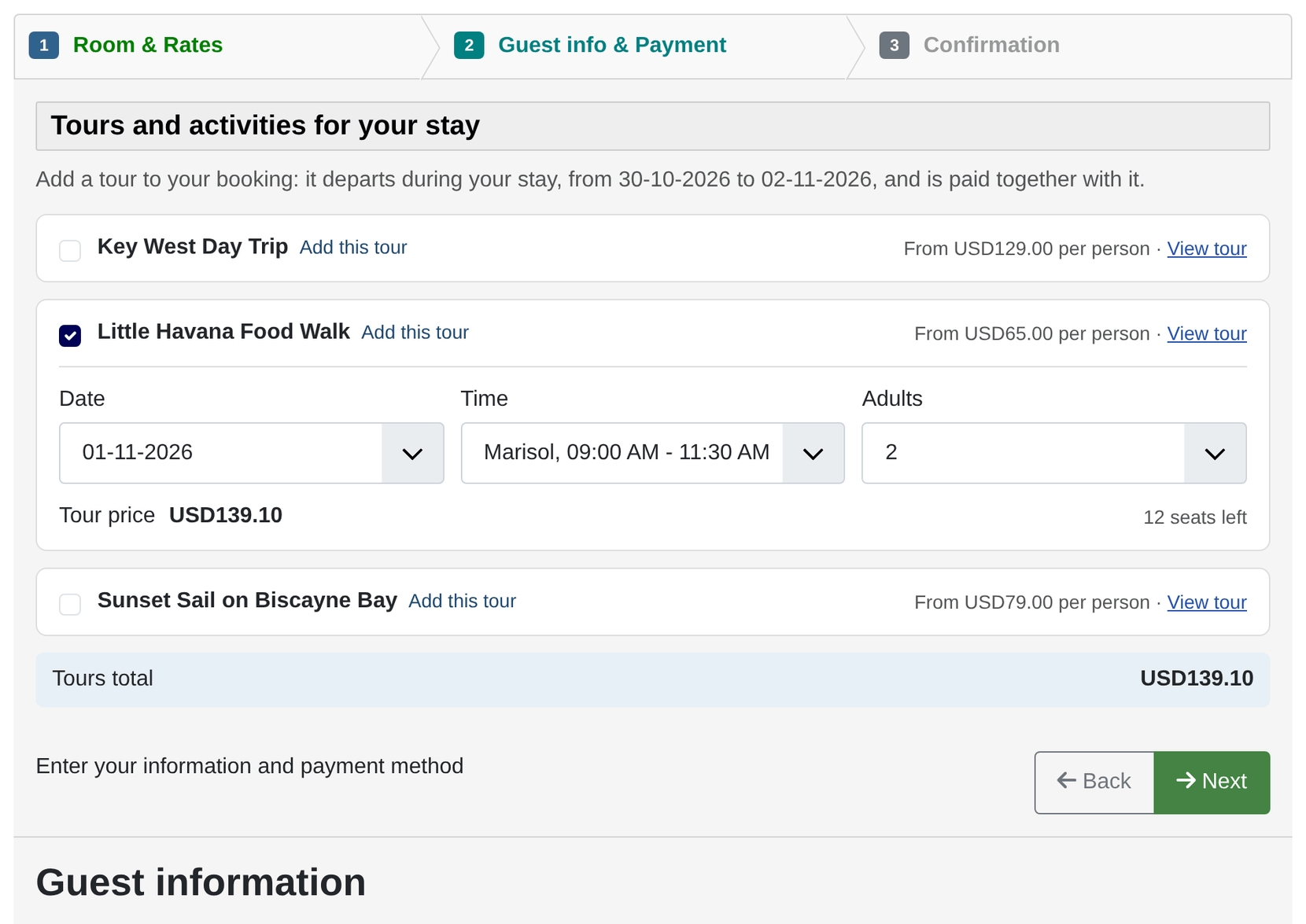
The confirmation step lists each tour above the grand total, with its own tax line, and the guest pays for the rooms and the tours at once, through the property's payment methods. The tours count wherever the reservation's total does: the deposit when it includes extras, the amount paid online, the confirmation emails, the final screen, My Reservations and the administrator's reservation screen. Just before the booking is saved it is checked once more, so a tour whose last seat went in the meantime is refused by name, and nothing is charged.
Each tour becomes a reservation of its own, linked to the stay, that follows the stay when it is confirmed, cancelled or trashed. The Reservations list gains a Tours filter for the stays with tours, and the Revenue report a Tours column. After booking, the final screen, the confirmation email and My Reservations offer Add a tour to your stay with the tours still open during it. How to configure Experience covers the set-up.
Bookings from other websites, apps and AI assistants
Until now, booking a Solidres property meant using its booking form. 4.6.0 adds a public booking API, which lets another website, an app or an AI assistant see the properties and room types your guests are shown, find what is free for given dates and guests, get a quote priced exactly as your booking form prices it, extras and tours included, and book it. Such a booking goes through the same checks, emails and plugins as one made on your site, and a payment method paid online sends the guest to your site's own payment page. Guests can look up their own booking with its code and their email address.
The API stays off until you switch on Public booking API in Solidres Options, on the Integrations tab, where you also set how many requests an address may send and how many searches a property takes per minute. Your site describes the API for developers and their tools at /api/index.php/v1/solidres/public/openapi.
Two more changes help search engines and assistants describe you correctly. A property page now tells search engines about its room types in schema.org markup, with the starting prices the page shows, check-in and check-out times, facilities and a link to book. And while the public booking API is on, your site answers /llms.txt, a page for AI assistants that lists your properties and says how to book through the API.
Complex Tariff and Statistics are gone
As announced with 4.5.0, the two plugins are removed. Updating enables Rate Plan on a site that used Complex Tariff. Rate Plan edits the same rate plans, so prices, rules and restrictions carry over with nothing to enter again. A site that used Statistics gets Front Desk and Dashboard, with the widget layout saved in its builder moved to the Dashboard, and links and menu items that pointed to Statistics open Front Desk and Dashboard instead.
Install Rate Plan, or Front Desk and Dashboard, before you update. They can stay disabled: the update enables them. It stops, with a message that names what is missing, on a site that has Complex Tariff enabled without Rate Plan installed, or Statistics enabled without Front Desk and Dashboard, so that no rate plan stops pricing bookings.
Next year's prices from this year's
A daily rate plan extended by a year used to need pricing again, day by day. With Rate Plan 1.2.0, choose Fill empty days from the previous year before saving, and every day without a price takes the price, minimum and maximum stay, interval and check-in days of the same date a year earlier, or of the same weekday 52 weeks earlier, which keeps weekend prices on weekends. Days that already have a price are not changed.
Weekly rate plans are fixed as well: the nights of a week that ran into the next month were free, so a stay across the end of a month cost less than it should.
Fixes
- Extras charged per night or per person: since Advanced Extra moved to Joomla 6, an extra charged per night was charged once for the whole stay, and one charged per person was free. Solidres now prices every charge type itself, on the booking form, the Hub's reservation form and the public booking API alike.
- Payment processing page: after paying online, the guest moves on to the booking's final screen as soon as the payment is confirmed. The page always made them wait a full minute.
- Print registration card: the button shows again on the reservation screen once a card has been saved.
- Text in any language: some tables, added by older updates and by a few plugins, refused text such as a name in Chinese on a database whose default character set is latin1. Every Solidres table now accepts text in any language, and the update converts those that did not.
- Properties not saved for a while: a property not saved since some of its settings were added now works as its screen shows. It accepts coupon codes, lists fully booked room types with a not-available note, hides prices while online booking is off and shows the room tax in the booking summary. Before, it worked the other way round until its next save.
- Trashing and cancelling: trashing reservations from the list, and cancelling one by setting its payment status to Cancelled, now tell the add-ons, as a change of status does. Channel Manager sends the freed dates to the channels, Stream records the change and Experience cancels the tours booked with the stay.
- Smaller fixes: a room extra without a quantity no longer stops the booking, the coupon box works on a site that displays PHP's deprecation notices, and the Reservations list keeps its filter bar open while any filter is in use.
- PDF library check: with the Invoice, Experience Invoice, Housekeeping or Hub plugin enabled, the System Info page checks that the dompdf library is installed with its files in place. A site rebuilt from another site's data can have it registered with its files missing, and then every invoice and voucher fails.
- Sample data: its extras, coupons and weekly rates work as they read.
Security
4.6.0 and the add-ons released with it fix several issues, and we recommend updating:
- Reservation note attachments: files staff attach to a reservation note, such as a scan of a guest's ID, could be fetched from the web without signing in. They are now served only through a download that checks who is asking.
- REST API: an API user who is not a Solidres manager, such as a Hub partner, now reads and changes only the data of their own properties, and only a Super User can put an account that administers the site on a property's staff. The payment details a payment method stored on a booking are no longer included for anyone.
- Experience: PDF vouchers emailed with a tour booking stayed where the web could reach them. With Experience 2.4.0 they are deleted once sent, and a PayPal payment confirms a tour booking only when it matches what the booking owes.
- Booking limits: with Limit Booking 2.0.4, a Hub partner changes booking limits on their own properties only.
For hosts and agencies
If you run the updates of a site for its owner, its staff can get a back office to match. Import the new Solidres back office (managed) preset into a custom administrator menu: it is the Solidres back office without Joomla Update, Extensions: Update, Install Extensions and Scheduled Tasks. It hides those menu entries; the user group's permissions still decide which screens open.
Before you update
- Take a backup. 4.6.0 adds two columns to the reservations table and a table for the public booking API's rate limits, and converts any Solidres table that is not utf8mb4 yet, which can take a little while on a large one.
- Complex Tariff and Statistics: if you still use either, install Rate Plan, or Front Desk and Dashboard, first.
- Update Solidres first, then the add-ons. Experience 2.4.0, Hub 2.4.1, Front Desk 1.1.1, Dashboard 1.1.1 and Advanced Extra 1.0.3 need 4.6.0. Update Invoice to 2.1.2 at the same time.
- Template overrides: the property screen is new, so an override of it, or of its old sub-templates, must be made again from the new files. On the site, the final screen, My Reservations, the steps of the booking form and the confirmation emails have changed. The System page flags any override that needs updating.
- On nginx: deny web access to
media/com_solidres/notes/in the server's configuration. nginx ignores the file that closes that folder, and attachments from before 4.6.0 keep their old names. - Applications using the REST API: one that reads the API with a partner's token now gets fewer results, and
payment_dataandtokenare gone from reservations and payment history.
Update today
Solidres 4.6.0 needs Joomla 6 and PHP 8.3 or later. Update it from System → Update, or download it from your solidres.com account. The add-on releases for 4.6.0 cover Experience, Lumina, the Hub, Rate Plan, Invoice and the rest. The full changelog ships with the release.