

Multilingual Joomla, without the slowdown
Translate articles, menus, modules and custom fields in Joomla's own edit forms. Up to 5.8 times as fast as Falang — and free, with no backlink.
Latest version: 3.0.1 for Joomla 6. Speedy Translate Lite and Speedy Translate Pro.
DOWNLOAD FREE GET PROFree for good. No backlink. No language limit.
Speedy Translate Lite translates your whole site and adds nothing to your pages: no credit link, no upgrade banners, no limit on languages. When you need more, Pro installs over it and keeps every translation you made.
5.8×
as fast as Falang on a translated article, at 10,000 articles
55–79%
fewer database queries than Falang, on every page measured
2–8 ms
added to Joomla's own time on most pages, even at 10,000 articles
0
backlinks, upgrade banners or language limits in Speedy Translate Lite
Translate where you already work
Speedy Translate keeps each article, menu item or module as one item and stores its translations with it. There are no copies to create, link and keep in step — and nothing new to learn, because you translate in the forms you already use.
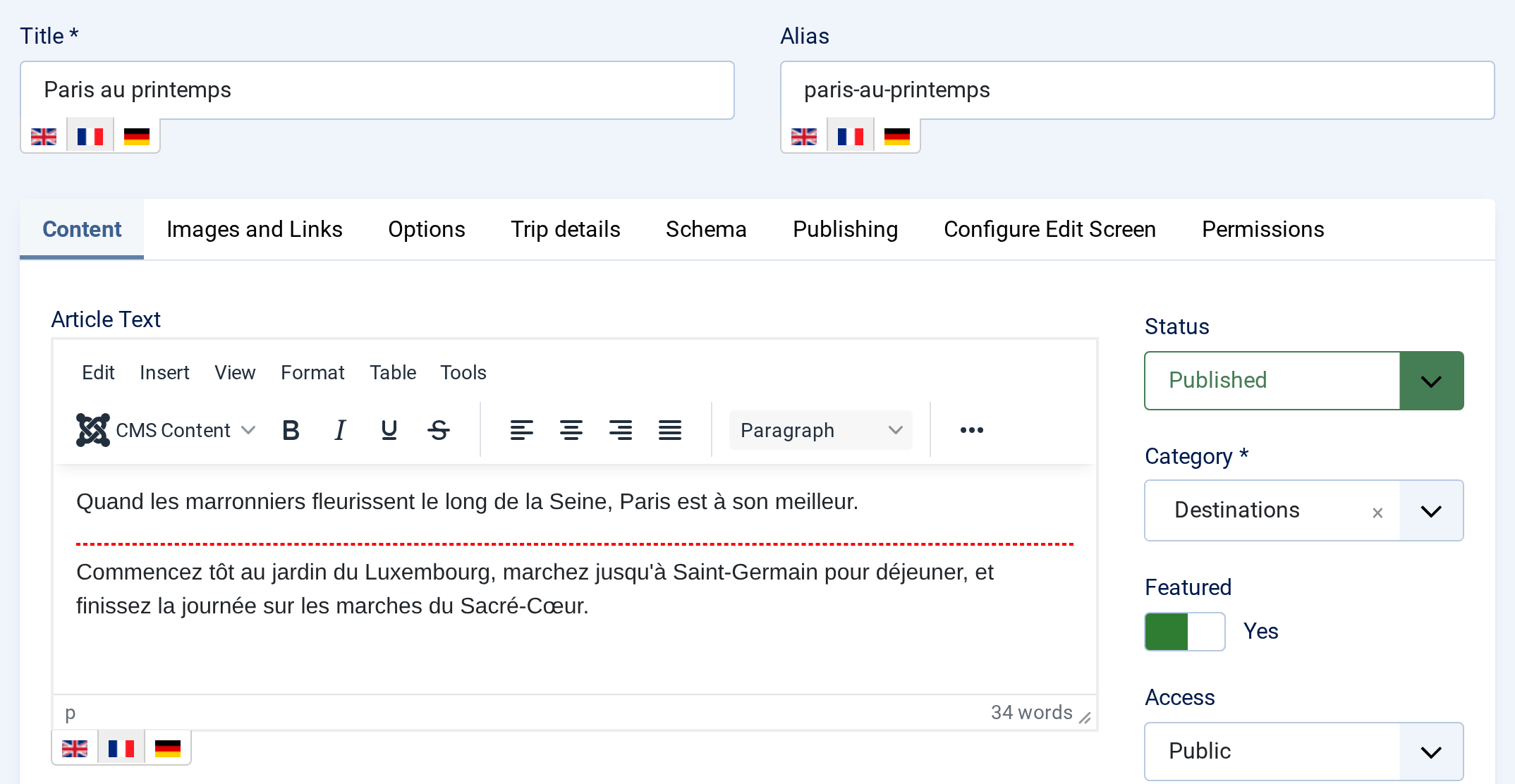
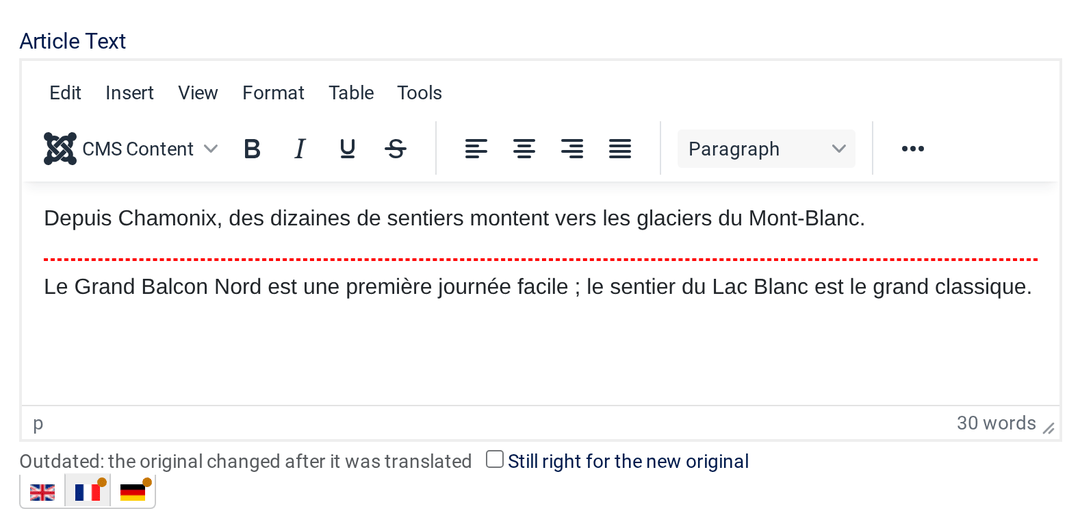
A flag under every field
Open any article, category, menu item, module, tag, contact or user. Each translatable field gets a row of flags: click one, type, and save every language at once. Titles, aliases, editor text, images, links, meta descriptions, module and menu options, custom fields — all of it. When the original changes later, an orange dot marks the translations that need a look, until you update them or tick Still right for the new original.
Always know what is left
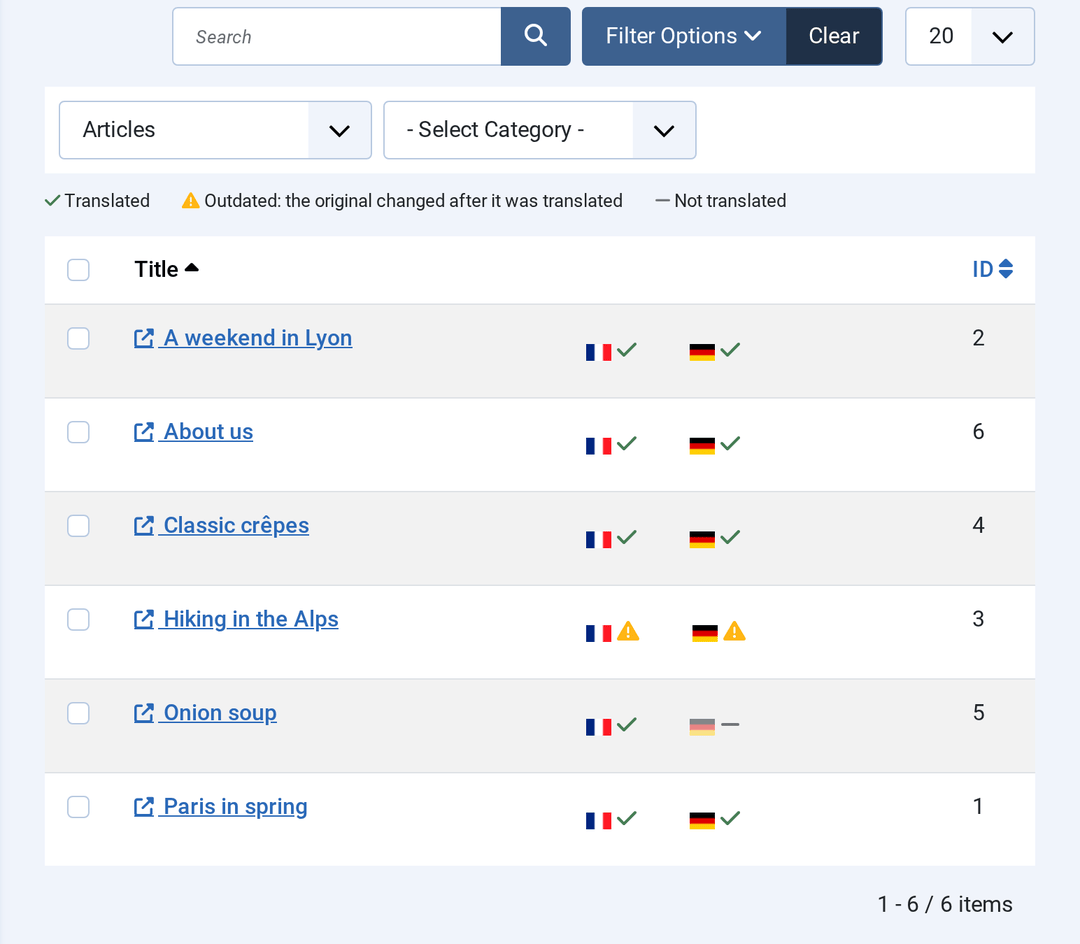
Batch translations lists every item of a content type with its status in each language: translated, outdated or not translated. Speedy Translate compares each translation with the original it was made from, so editing an English title flags its French and German at once. Click a title to translate it in its own form.
Every language, found by search engines
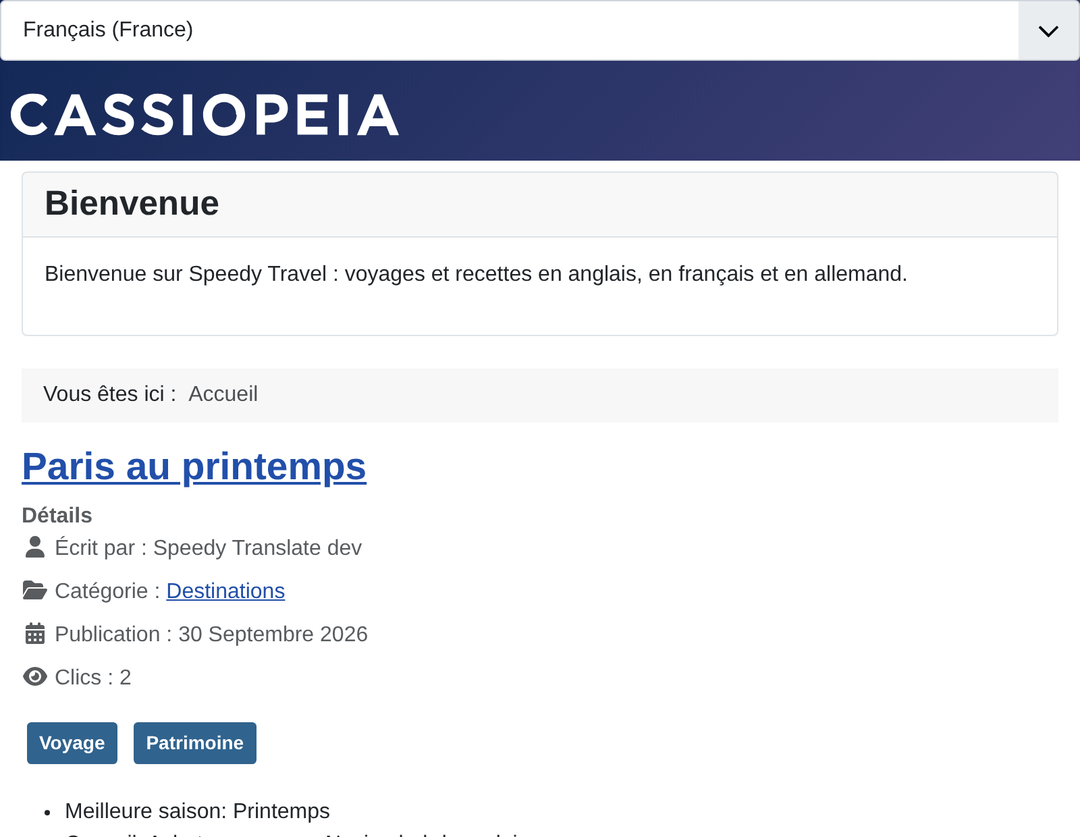
Each page lists its other languages in hreflang and x-default tags, following the settings of Joomla's Language Filter. Addresses are translated too — /fr/voyages/paris-au-printemps — and the language switcher renders real links that work without JavaScript, in four layouts: drop-down, inline, pop-over and off-canvas.
Machine translation, when you ask for it
Press Translate from en-GB in a language tab, read the preview, then Use this translation. Nothing is sent to a provider until you ask, and you use your own account, billed by the provider at its own price. Long articles are sent in pieces cut between HTML elements, so headings, lists and tables come back whole.
- Google, DeepL and Yandex in Lite and Pro
- ChatGPT, Claude and Gemini in Pro, in the model you type in — a new model works the day it ships
- A glossary in Pro: brand names kept as they are, terms translated your way
- A provider and account per language in Pro
Faster than Falang on every page we measured
Speedy Translate and Falang store translations the same way: one item per article, its translations beside it. What differs is how much work each does while a page is built. We measured both on the same Joomla 6 site, with the same content, at 100, 1,000 and 10,000 articles.
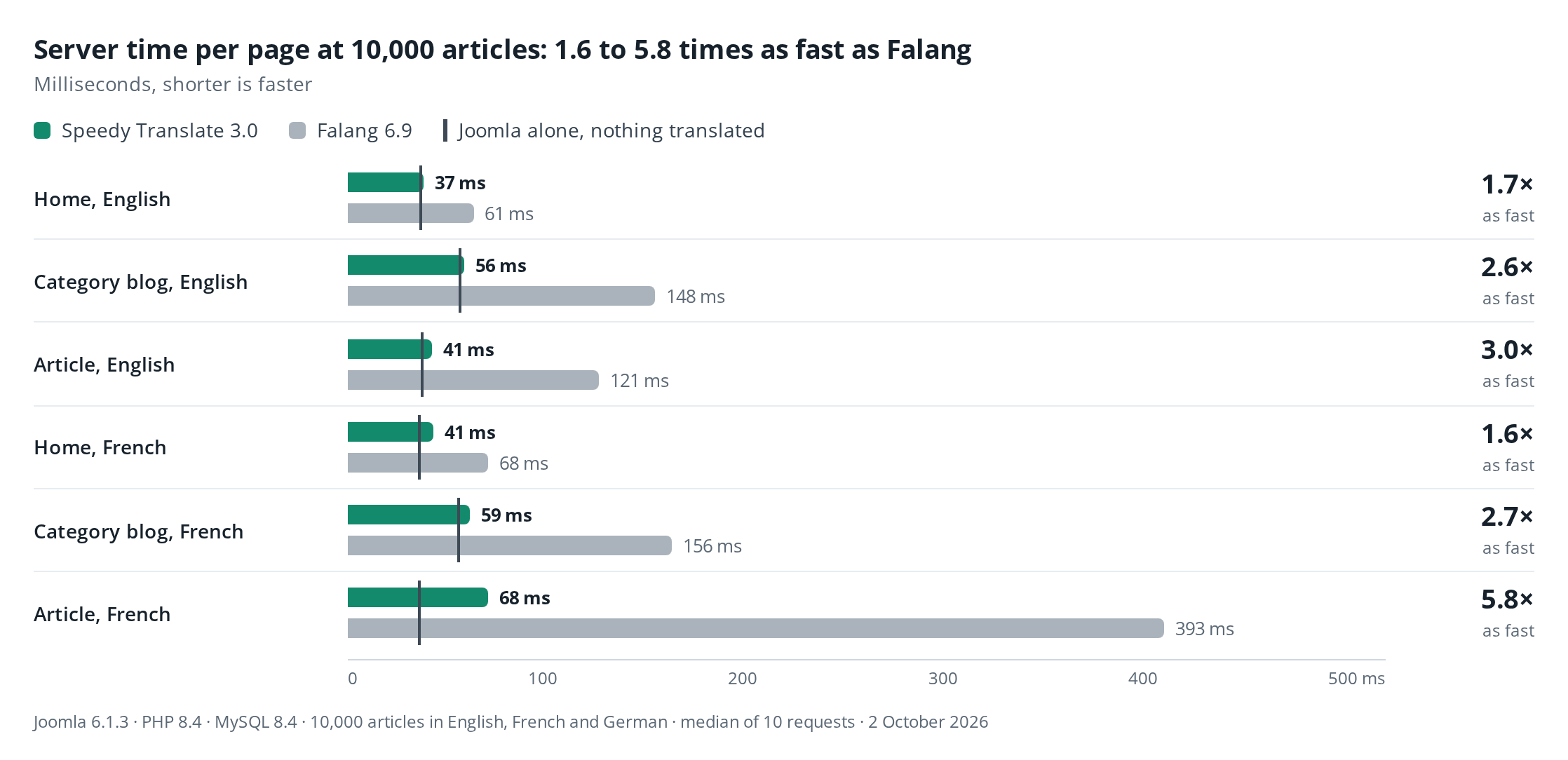
- 1.6 to 5.8 times as fast at 10,000 articles: 2.6 to 3.5 times on category pages, 3.0 to 5.8 on article pages, 1.6 to 1.8 on the home page, across the three site sizes.
- 55 to 79% fewer database queries: 40 against 192 on a category blog.
- Close to Joomla's own speed. At 10,000 articles, Speedy Translate adds 2 to 8 ms to five of the six pages; Falang adds 26 to 104 ms.
- Up to 70% less memory on large translated pages, and 98% fewer database rows read: 5,853 against 349,147 on the translated article.
One Joomla 6.1.3 site on one development machine (PHP 8.4 with OPcache, MySQL 8.4, no page cache), 2 October 2026. Your own times will differ — compare the ratios. Falang's free edition was measured; Speedy Translate Lite and Pro run the same code on a visitor's page. The full comparison and every figure.
What Falang's free edition leaves on your site
A backlink on every page
Falang Free adds a link to its author's site under the main content of every page, in 8-pixel text: FaLang translation system by Faboba. It is a followed link, with no nofollow, and it goes only when you buy Falang.
Speedy Translate Lite adds nothing to your pages.
MySQLi only
Falang translates only on sites that use Joomla's MySQLi driver. On a site set to MySQL (PDO) it leaves your pages untranslated, and its control panel asks you to change the driver in Global Configuration.
Speedy Translate works with both of Joomla's MySQL drivers.
Translation outside the form
In Falang Free you translate in Falang's own screens, one content element at a time. Its button for translating from an article's form answers that the feature is not available on the free version.
Speedy Translate Lite translates in Joomla's own forms.
COMING FROM FALANG? Migrate from Falang on Speedy Translate's dashboard copies Falang's translations — articles, categories, menus, modules, custom fields and the Solidres tables. You see what it will do before it runs and a report after, and Falang's own data is left untouched. In Lite and Pro. How the import works.
Speedy Translate Pro, for large sites and agencies
Pro installs over Lite, keeps your translations and settings, and adds the tools that save hours on a big site.
Translate the whole site in the background
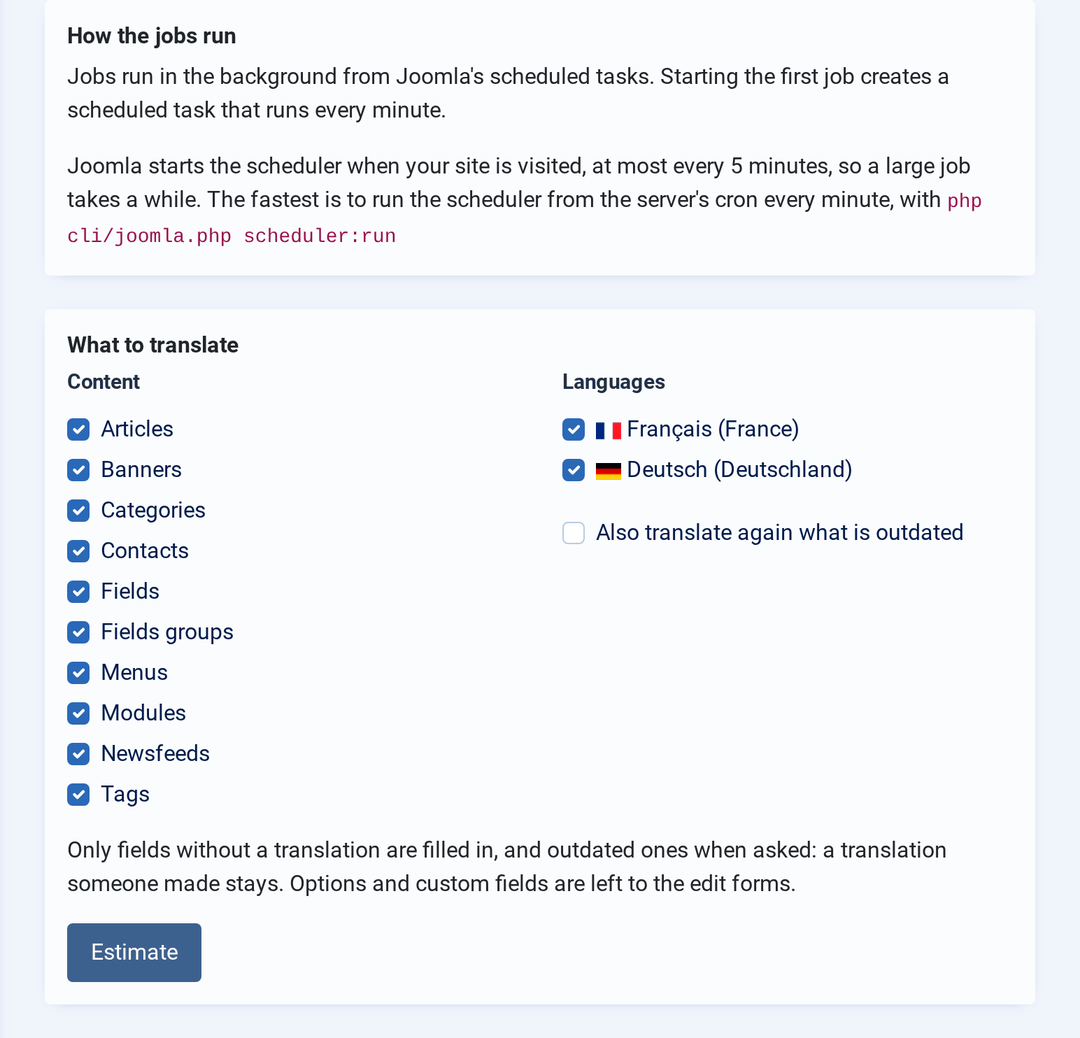
Pick content types and languages, read what it would translate and roughly what it costs at the providers' list prices, then start. The job runs from Joomla's scheduled tasks, so you can close the page; pause, resume or cancel it at any time. It only fills gaps: a translation someone typed stays as it is.
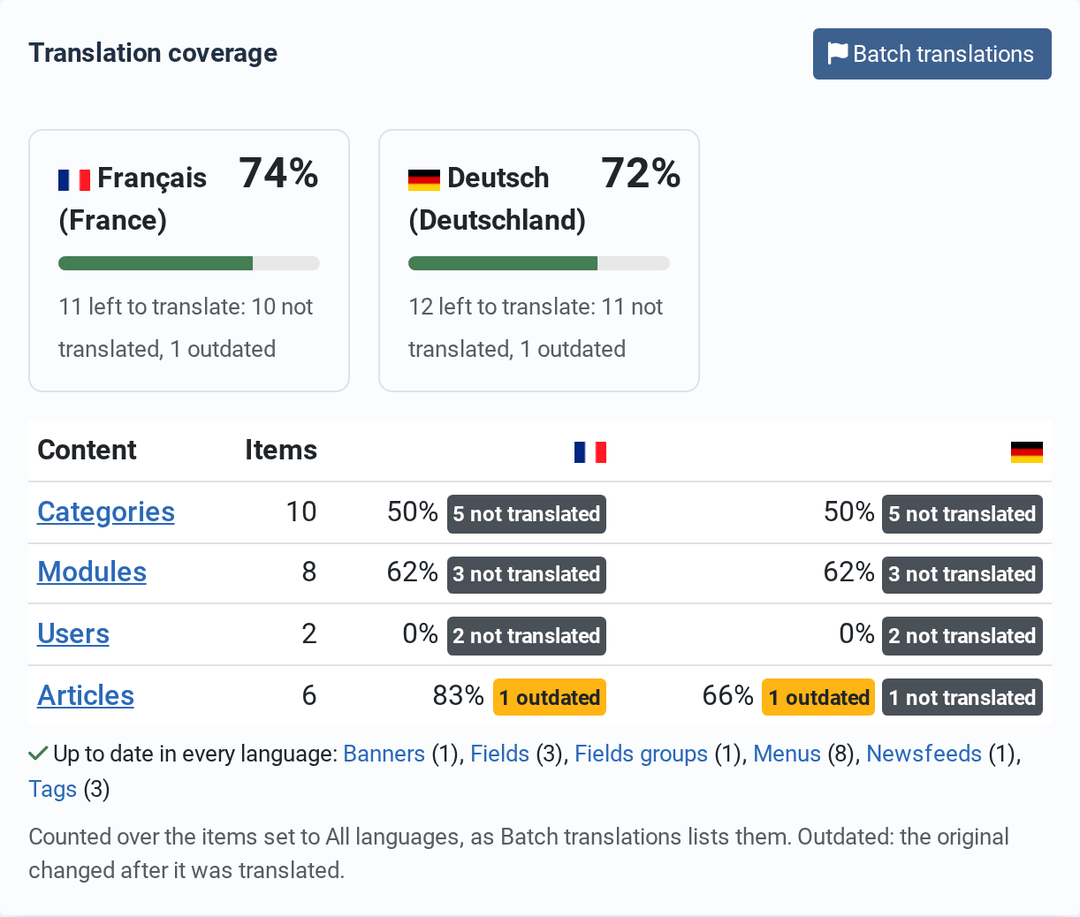
Coverage at a glance
The dashboard shows how much of each language is translated and up to date, and what is left, per content type — each row a link to the items behind it.
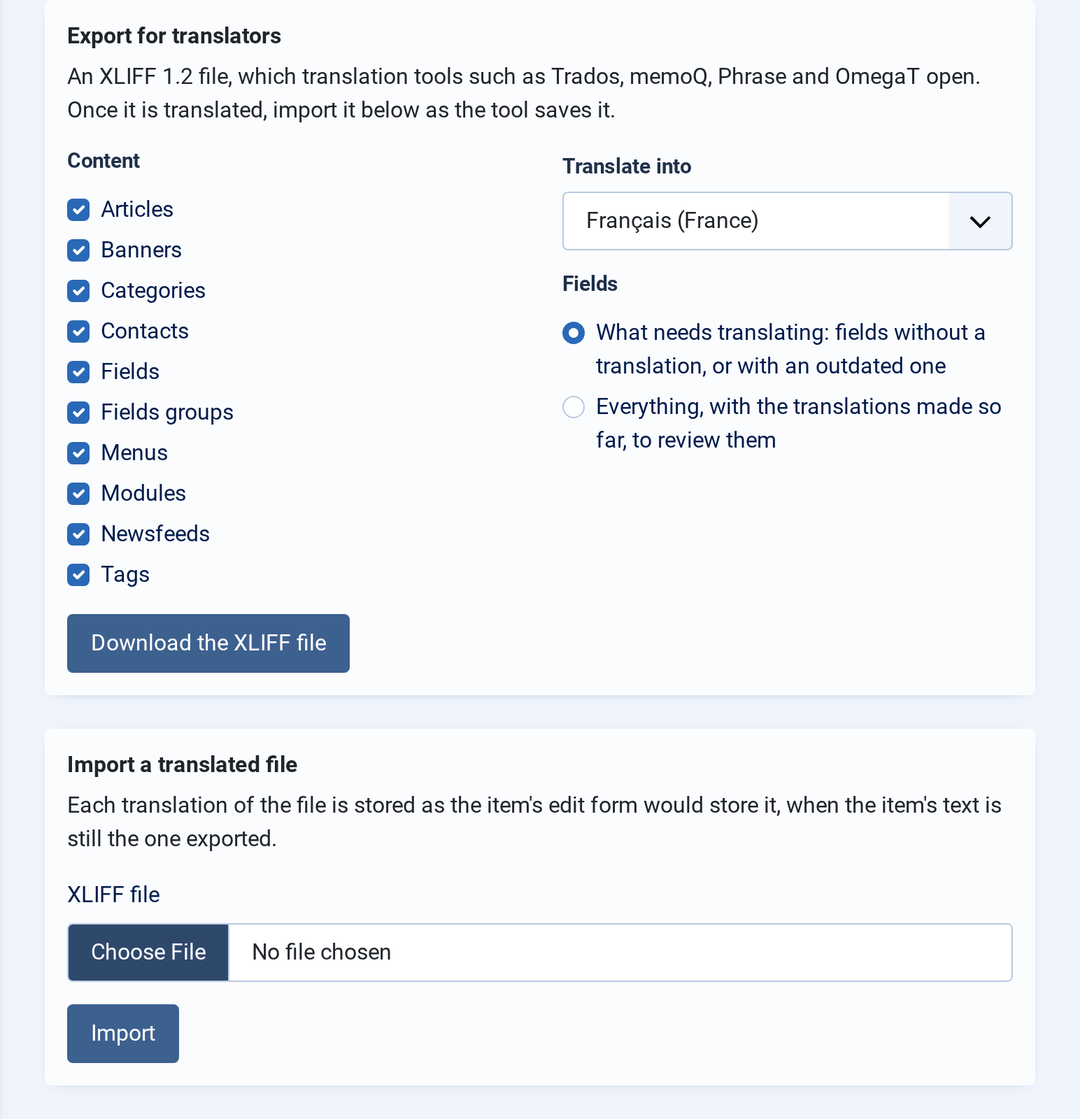
Work with translation agencies
Export what needs translating as XLIFF 1.2, which Trados, memoQ, Phrase and OmegaT open, and import the file your translator sends back. A unit whose original changed since the export is listed, not imported, so an old translation never lands on new text.
- ChatGPT, Claude and Gemini, with your prompt and the model you choose
- A translation provider and account for each language
- A glossary for brand names and fixed terms
- Smart Search in the visitor's language
- HikaShop, J2Store, JEvents, K2, SP Page Builder and Creative Contact Form
- Context translation: click a language string on your site to change it
- Syntax checker, duplicate, missing and orphan keys for language files
- Unlimited support tickets
Works with your content
| Content | Edition |
|---|---|
| Joomla: articles, categories, menu items, modules, custom fields and field groups, tags, contacts, banners, news feeds, users | Lite and Pro |
| Solidres: properties, room types, extras, tariffs, coupons, custom fields, facilities, experiences and more | Lite and Pro |
| Restaurant Management System: restaurants, menus, menu groups, dishes, promotions | Lite and Pro |
| HikaShop, J2Store, JEvents, K2, SP Page Builder, Creative Contact Form | Pro |
Building an extension? It can ship its own Speedy Translate adapter, which works in Lite and Pro alike — see the developer guide.
Plans and pricing
$0
LITE
- Translation in Joomla's edit forms
- Joomla core, Solidres and RMS content
- hreflang, translated URLs, switcher
- Google, DeepL and Yandex
- Import from Falang
- No backlink, no language limit
$49
PRO
- Everything in Lite
- Bulk translation in the background
- ChatGPT, Claude and Gemini
- Glossary, coverage, XLIFF
- Smart Search, commercial adapters
- Unlimited support tickets
How it works
- Prices are in US dollars. Pro is a subscription: updates through Joomla's updater with your Download ID, and support, while it runs. When it ends, Pro keeps working; updates and support stop until you renew.
- Lite updates through Joomla's updater with no account. Support is part of the Pro subscription.
- Pro installs over Lite and keeps your translations and settings. Lite installs over Pro and keeps your translations. Never uninstall to switch: uninstalling deletes the translations.
- Speedy Translate 2 sites move to 3.0 by installing it over 2.x: Pro from your account, or Lite for free. Translations stay.
Lite and Pro, feature by feature
| Feature | Lite | Pro |
|---|---|---|
| Translation in the language tabs of Joomla's edit forms | Yes | Yes |
| Translated, outdated and not translated status | Yes | Yes |
| Language switcher (four layouts), hreflang, translated URLs | Yes | Yes |
| Setup check on the dashboard | Yes | Yes |
| Import from Falang | Yes | Yes |
| Machine translation with Google, DeepL and Yandex | Yes | Yes |
| Search and override language strings | Yes | Yes |
| Joomla core, Solidres and Restaurant Management System content | Yes | Yes |
| ChatGPT, Claude and Gemini; a provider per language; glossary | — | Yes |
| Bulk translation in the background, with a cost estimate | — | Yes |
| Translation coverage on the dashboard | — | Yes |
| XLIFF export and import | — | Yes |
| Smart Search in the visitor's language | — | Yes |
| HikaShop, J2Store, JEvents, K2, SP Page Builder, Creative Contact Form | — | Yes |
| Context translation, syntax checker, duplicate, missing and orphan keys, import and export of overrides | — | Yes |
| Support tickets | — | Unlimited |
Getting started
- Install the package with Joomla's extension installer. The dashboard opens with a setup check.
- Set up your languages, the Language Filter, hreflang and the language switcher — one click each, and it even installs language packs from Joomla's language server.
- Translate: open an article set to All languages, click a flag, type, save.
- Coming from Falang? Run Migrate from Falang from the dashboard first.
Every step is written out in How to configure Speedy Translate.
What you need
REQUIREMENTS:
- Joomla 6.0 or newer
- PHP 8.3 or newer
- A MySQL or MariaDB database, through either of Joomla's drivers: MySQLi or MySQL (PDO). PostgreSQL is not supported
- At least two content languages — the dashboard's setup check can install and publish them
Frequently asked questions
1. Is Speedy Translate Lite really free?
Yes. It is GPL software with no backlink, no language limit, no time limit and no account needed for its updates. Support is part of the Pro subscription.
2. Will it slow my site down?
Very little. On a Joomla 6 site with 10,000 articles, Speedy Translate added 2 to 8 ms to Joomla's own time on five of the six pages measured, and 34 ms on a translated article whose previous and next links make Joomla read 1,000 articles. It uses one database connection, and visitors load none of its editing scripts.
3. Does it copy my content for each language?
Not in its own mode, which we recommend: each item stays one item and its translations are stored with it. If you prefer Joomla's multilingual associations, where each language has its own copy, Speedy Translate creates and links those copies from the same language tabs.
4. I use Falang. How do I move?
Install Speedy Translate and open Migrate from Falang on its dashboard. It shows what it will import, keeps any translation you already made in Speedy Translate unless you ask it to replace them, and leaves Falang's data untouched. Step by step.
5. Which Joomla versions does it support?
Speedy Translate 3 needs Joomla 6.0 or newer and PHP 8.3. On a Joomla 5 site, update Joomla first.
6. What does machine translation cost?
Speedy Translate charges nothing for it. You enter your own key from Google, DeepL, Yandex or, in Pro, OpenAI, Anthropic or Google AI Studio, and the provider bills you at its price. Nothing is sent until you press Translate, or start a bulk job after reading its estimate.
7. Can I go from Pro back to Lite?
Yes. Install Lite over Pro: it removes the Pro files and keeps your translations. Install Pro again later and the Pro tools come back.
8. I run Speedy Translate 2. What changes in 3.0?
Download Pro 3.0 from your account and install it over 2.x: Joomla's updater cannot fetch it for most 2.x sites, as version 2 never passed it the Download ID. Without a subscription, install Lite over 2.x for free. Your translations stay either way. Check these after updating: Yandex now needs a Yandex Cloud API key, the language switcher's markup changed (template overrides of it need redoing), custom code that calls the translation endpoint must send Joomla's form token, and a site that ran in the Falang mode stays translated by Falang until you run Migrate from Falang. See the upgrade notes.
9. On how many sites can I use it?
As many as you like: Lite and Pro are GPL. A Pro subscription includes support for one domain.
10. Can I keep using Pro when my subscription ends?
Yes. Pro keeps working; updates and support stop until you renew.
11. Can Speedy Translate translate my favourite extension?
If it is not listed above, send us its name and a download link and we will look at it. Extension developers can also ship an adapter themselves.
12. I do not have a PayPal account. How can I pay?
PayPal lets you pay by credit card without a PayPal account. On the PayPal checkout page, use the "Don't have a PayPal account" option and enter your card details there. Creating an account is offered but not required.
13. As a Pro subscriber, how many support tickets can I open?
Unlimited. We do not limit questions or tickets.
We accept

Next steps
Compare it with Falang
The benchmark in full, the backlink and database driver details, and a feature-by-feature table of both free editions — including where Falang is still the better fit.
Read the comparisonWant to read the manual first?
Installing, the setup check, translating content, machine translation, the switcher and SEO, language strings, bulk translation and XLIFF.
Read the documentation