

Solidres 4.7.0 is out. Your guests' booking emails have a new design, and you write them yourself: a new Emails screen gives each email a subject and a message per property and per language, with a preview and a test sent to you, and no Super User needed.
The reservation screens are rebuilt, for your staff and for your guests. The reservations list has quick filters, status badges and date ranges, and stays fast however many bookings it shows; a booking opens on a summary. Guests see their bookings under Upcoming, Past and Cancelled, and each one reads like a receipt. And your site can now ask for cookie consent by itself, in your guests' language and your template's colours.
This release also fixes the issues of our security review that were still open, so we recommend updating. If you changed an email with a template override or a language override, read Before you update first.
Booking emails you word yourself
Until now, changing what a confirmation email said meant a language override or a copy of a 900-line PHP layout. In 4.7.0, Solidres → Emails lists each email your guests receive, with its subject and the message above the booking's details, per property and per language. Insert a value adds the guest's name, the reservation code, the dates or the amounts; Preview shows the email with the property's latest booking; Send me a test sends it to you; Reset to standard text brings back the standard wording, translated into all 25 languages Solidres comes in. Anyone allowed to edit properties can use it.
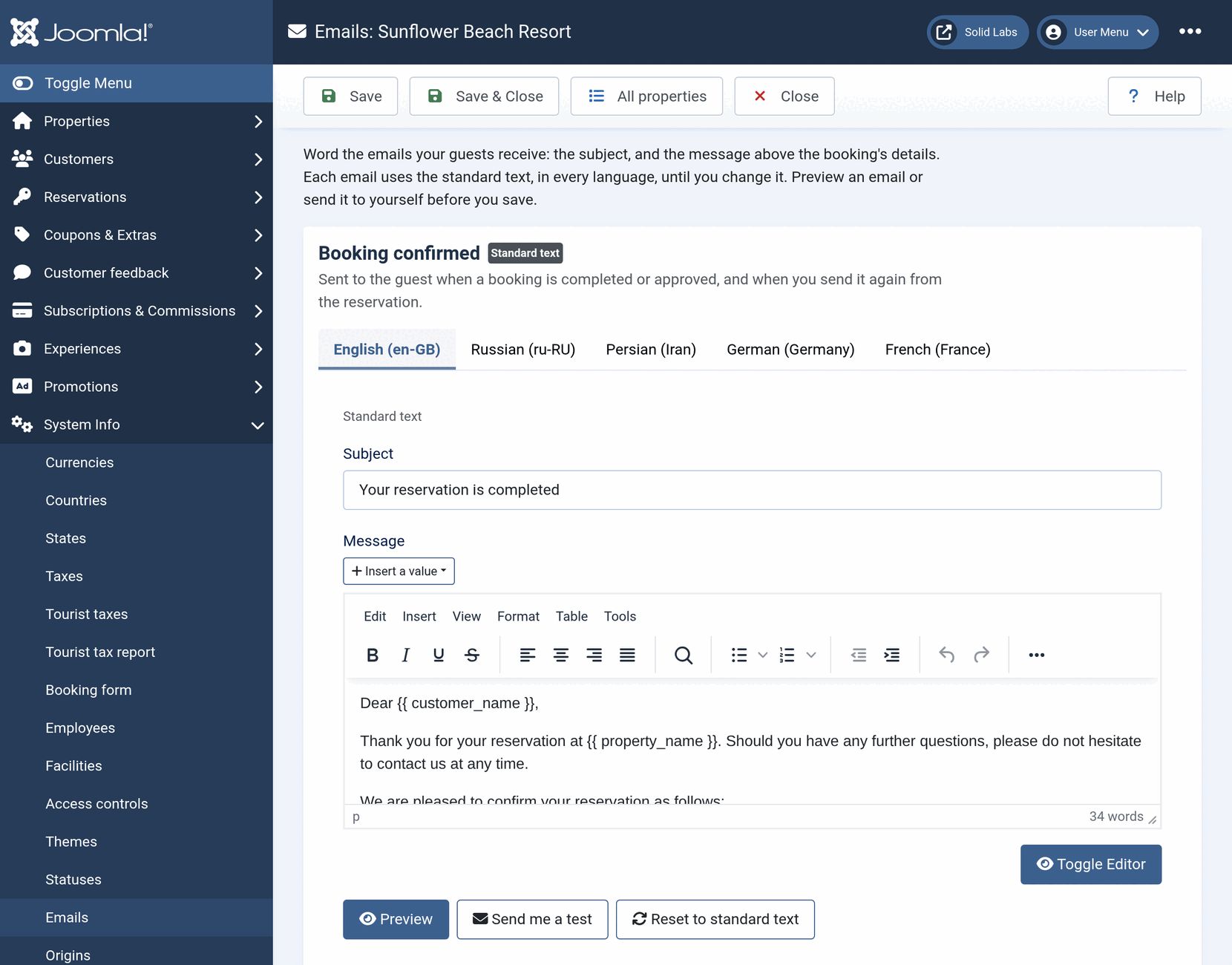
Every email about a booking now shares one design: a single column that reads well on a phone, the property's logo at the top and its contact details at the foot, your template's main colour, dark mode in the mail apps that offer it, and right to left in Arabic, Hebrew and Persian. Lines with nothing to show, such as a coupon or a deposit of zero, are left out. The status emails, the payment reminder of Invoice and the review request of Feedback use the same editor and the same values.
A Super User can also open the email's whole template in a code editor, and a template can carry its own copies, checked on the System page like any override. A subject, message or template that cannot be sent is refused when you save it, with the reason. Wording the emails your guests receive covers it all, and our earlier post explains how to tell whether you changed an email before.
New reservation screens
For you and your staff
The reservations list opens with four quick filters, each with its count: All, Arrivals today, Departures today and In-house, the same bookings as the dashboard's tiles. The status and payment status are badges, the four date filters become two ranges, Check-in from and Check-out from, and a date filter waits until you pick a day. The list reads its data once per page instead of once per booking: a page of 100 bookings that took 241 database queries now takes 46.
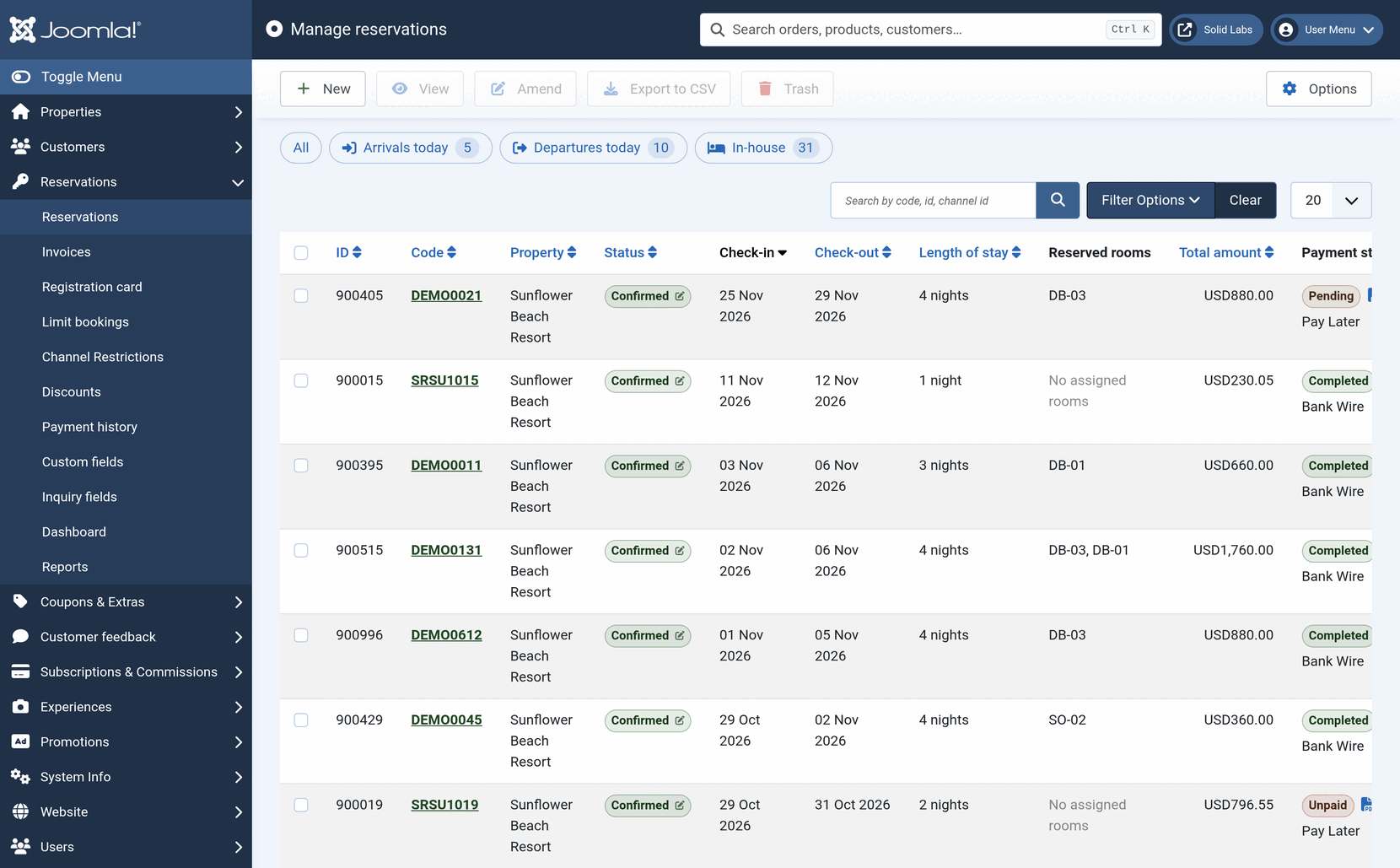
A booking opens on a summary above its tabs: the property, the dates, the status, the total, what was paid and the balance due. A figure you can change in place is a button you reach with the keyboard, and changing what was paid updates the balance due at once. Hub partners get the same list and the same screen with Hub 2.5.0. Managing reservations goes through both.
For your guests
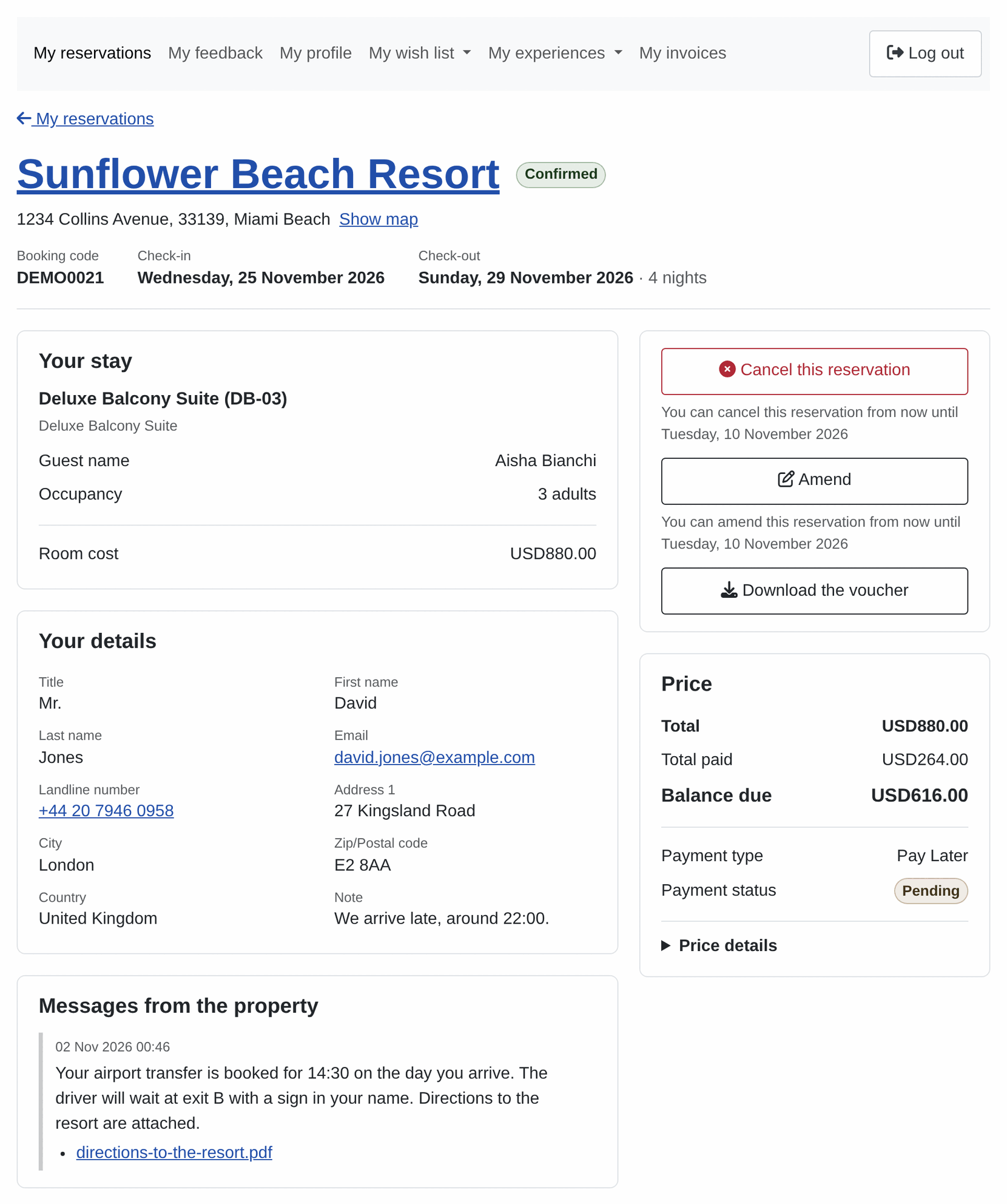
Signed-in guests see their bookings under Upcoming, Past and Cancelled, with a search by booking code, each booking a card with the property's photo, the dates, the total and the balance due. A booking still awaiting your approval is listed as such; it used to be left out.
Manage booking and the tracking page read like a receipt: the property, the dates and the status first, then what was paid and what is still due, the rooms, the guest's details and your messages. Guests download their voucher and, with Invoice, their invoice, as well as the files you attach to a note shown to them. Cancelling asks once more before it cancels, and the last day to cancel shows in the guest's language.
See How to configure front-end customer dashboard.
A cookie banner of your site's own
Turn on Show the cookie banner in Solidres Options, on the new Cookie consent tab, and your site asks visitors before it runs tracking scripts: Accept all, Reject all, or Settings to choose by category. It asks only when something waits for an answer, such as Conversion tracking's tags on the booking pages, so a site with nothing to ask shows nothing. It sets Google's consent signals before any Google tag runs, it is translated into every language Solidres comes in, and it takes Lumina's colours and its light and dark modes.
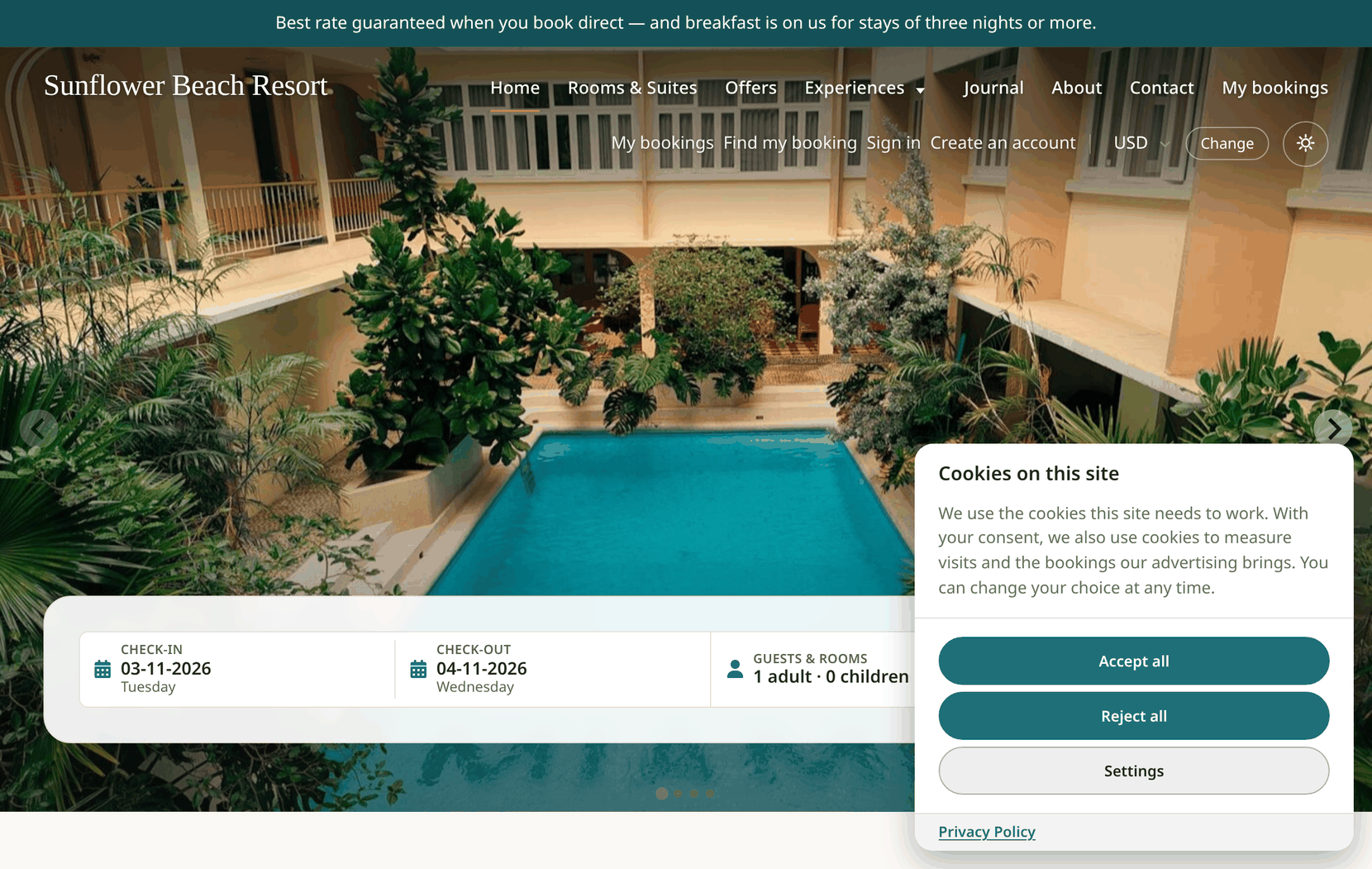
Any script of your own can wait for consent too, and a link to #cookie-settings in your footer lets visitors change their choice. The banner is off on an updated site until you turn it on. See Cookie consent on your site.
Also new
- Solidres news: Solidres → News lists the latest posts of this blog, on releases and security fixes, and the menu shows how many you have not read. It reads solidres.com about twice a day and sends nothing about your site. Turn it off with Show Solidres news in Solidres Options.
- Customers to CSV: the Customers list exports the customers it shows, under its filters and search, with their contact details, booking counts and profile fields.
- Site name and meta description: set from the Website tab of Solidres Options, without opening Joomla's Global Configuration.
- Extension - Solidres is built in: the property's house rules, facilities and social links, and the room type's conditions and facilities, are fields of the property and room type forms, and the plugin's Required, Optional and Disabled settings are on a new Form fields tab of Solidres Options. Updating carries everything over and removes the plugin.
- Lighter pages: the Legacy date picker is gone, as announced with 4.5.0, and jQuery UI with it, about 150 KB less on every Solidres page. Sites still on the Legacy picker switch to the range picker when they update.
Fixes
- Monthly rate plans: extending a monthly rate plan's dates adds the new months, ready to price. They used to be missing, so a stay in them cost nothing and the rate plan was not offered.
- Reserved rooms: the reservations list shows the rooms each booking holds. A booking whose code was longer than the database allows, with some Reservation code format settings, showed No assigned rooms.
- Confirmation date: recorded for every confirmation, with the right hour. It was recorded only when status emails were on, and on a 12-hour clock.
- Totals on Manage booking: the grand total counts the payment method's surcharge or discount, a tourist tax paid at the property and the tours booked with the stay.
- Checkout: the booking conditions and privacy policy are linked only when Solidres Options names them; with nothing set, the links went to a page that does not exist.
- Dashboard tiles and sorting: a tile opens the list with its own filter only, and sorting by property, length of stay, total or channel order ID works.
- Wishlist: removing a property no longer reloads the page, and the remove button works with the keyboard and on touch screens.
- System page: Fix schema repairs the database as Joomla's own Fix does, instead of emptying the folder of update files, and Solidres runs on servers that preload PHP files with opcache.
Security
4.7.0 and the add-ons released with it close the rest of the issues our security review found. The main ones in Solidres itself:
- Guest text: details a guest typed into a booking are shown as text on every screen, so a guest can no longer put script in them that runs when your staff open the booking.
- Bookings of others: a signed-in customer, a Hub partner or a REST API user limited to some properties could list bookings that were not theirs. Each now sees only their own.
- Vouchers and payment records: a booking's voucher downloads only for its guest or a partner of its property, and only staff of the property change its payment records.
- Card security codes: no longer asked for at checkout. With Offline 1.0.2 the codes already stored are removed.
- Actions on your behalf: check-in, check-out, the figures changed in place and the guest's cancel check that the request came from your own site, and the payment links a gateway sends guests back to are signed by your site.
- Booking codes are random, and the System page's tools need Solidres' Configure permission.
Before you update
- Take a backup. 4.7.0 adds two tables for the email templates and texts.
- Emails you changed: the PHP email layouts are removed. An email changed with a template override of
layouts/com_solidres/emails/, or with a language override of strings such asSR_EMAIL_GREETING_TEXT, goes back to the standard design and text when you update. Move your change to the Emails screen, as the article shows; the screen names the language overrides your site still has. - Update Solidres first, then the add-ons. Hub 2.5.0, Experience 2.5.0, Invoice 2.2.0 and Feedback 2.2.0 need 4.7.0. Update the Hub with it: an older Hub's check-in buttons are refused. Update Custom Fields to 2.0.3 and Offline to 1.0.2 at the same time.
- Status emails: a site that disabled Extension - Solidres to stop the email on a change of status gets them again: turn off Email when changing reservation state in Solidres Options instead.
- Template overrides: the reservations list, the reservation screen, the guest's bookings list, Manage booking, the tracking page and the wishlist changed. An override of the guest's bookings list made before 4.7.0 shows only the upcoming bookings. Fields you added to Extension - Solidres' XML files need a small plugin of their own, as How to add custom fields shows. The System page flags every override that needs updating.
- Your own code: overrides or scripts that drew the Legacy date picker or relied on jQuery UI get nothing from Solidres any more.
Update today
Solidres 4.7.0 needs Joomla 6 and PHP 8.3 or later. Update it from System → Update, or download it from your solidres.com account. The add-on releases for 4.7.0 cover the Hub, Experience, Invoice, Feedback, Conversion tracking and the rest. The full changelog ships with the release.