
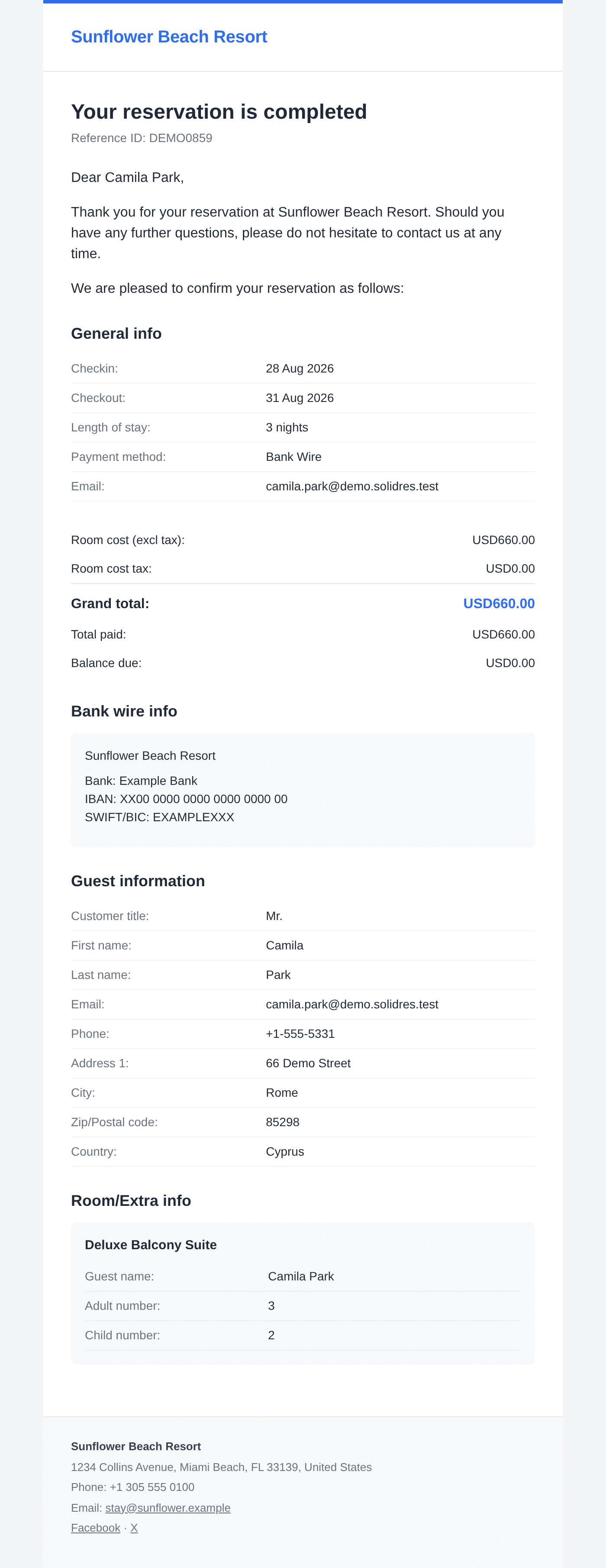
Every email Solidres sends about a booking has two parts: the wording at the top, which greets the guest and says what the email is about, and the details below it: the dates, the rooms, the prices and your contact lines. From Solidres 4.7.0 you write the wording yourself on the Emails screen, per property and per language, with the booking's values such as the guest's name and the reservation code. You see the result on your latest booking and send yourself a test before a guest receives it. Until you change an email, it uses the standard text, translated into every language Solidres comes in.
PREREQUISITES:
- Solidres 4.7.0 or later. With the Invoice add-on, Invoice 2.2.0 or later; with Feedback, Feedback 2.2.0 or later.
- A Joomla administrator account allowed to edit properties. Editing an email's full template needs the Super User.
Open the Emails screen
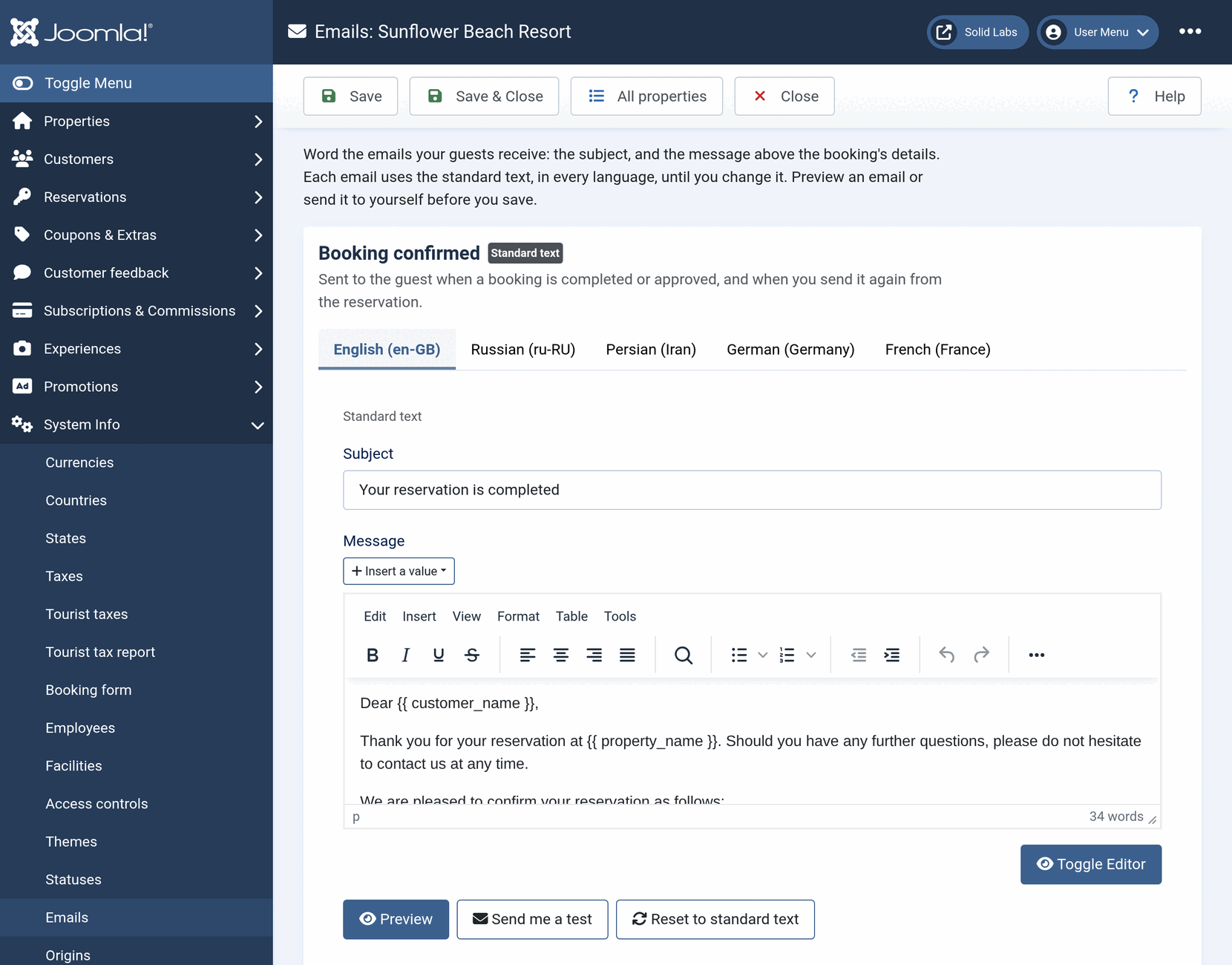
Open Solidres → Emails in the administrator menu (in the System Info group, beside Statuses). You can also start from a property: on its Booking tab, the Booking emails section has a link Edit the wording of these emails, which opens that property's emails in a new browser tab.
Emails are worded per property. On a site with one property the screen opens on its emails. On a site with several, it first lists the properties with the number of emails each has its own text for: click a property's name. All properties in the toolbar takes you back to the list.
The emails
Each email has a section of its own, with a line saying when it is sent. A badge beside its name says Standard text while it still uses the standard wording, or Your own text once you have changed it.
| Sent to the guest | |
|---|---|
| Booking confirmed | When a booking is completed or approved, and when you send it again from the reservation |
| Booking received | Instead of the confirmation, when the property approves each booking first |
| Booking cancelled | When a reservation is cancelled |
| Booking status changed | When a reservation's status changes, other than to cancelled |
| Message from the property | When you add a note to a reservation and send it to the guest |
| Invoice | With the invoice attached, when you email the invoice from a reservation (Invoice add-on) |
| Review request | With a link to review the stay: when you check the guest out, when the reservation reaches the status set in Options → Feedback, and when you send it from the reservation (Feedback add-on) |
An add-on's email is listed only while the add-on is enabled. The email the property receives about a new booking, New booking notification, has no wording to change: its text comes from Solidres's language files, and only the Super User sees it on the screen, to edit its full template.
Write the subject and the message
Each email has a Subject and a Message. The message is what the guest reads above the booking's details. The standard message of Booking confirmed is:
Dear {{ customer_name }},
Thank you for your reservation at {{ property_name }}. Should you have any further questions, please do not hesitate to contact us at any time.
We are pleased to confirm your reservation as follows:
Write the message in the editor as you would an article: paragraphs, bold, lists and links. The words in double braces, such as {{ customer_name }}, are values: each is replaced by the booking's own when the email is sent, so Dear {{ customer_name }} reaches the guest as Dear Anna Schmidt.
To add a value, put the cursor where it goes and choose it from Insert a value above the editor. You can also type it, braces and all. Values work in the subject too: Your stay at {{ property_name }}, {{ checkin }}.
Click Save or Save & Close when you are done. Everything on the screen is saved together, and nothing reaches a guest until you save.
The values
| Value | What it prints |
|---|---|
| Guest | |
{{ customer_name }} | The guest's full name |
{{ customer_firstname }}, {{ customer_lastname }} | The guest's first name, last name |
{{ customer_email }} | The guest's email address |
| Booking | |
{{ reservation_code }} | The reservation code |
{{ reservation_status }} | The reservation's status, such as Confirmed |
{{ checkin }}, {{ checkout }} | The check-in and check-out dates, in the date format of Solidres Options |
{{ nights }} | The number of nights |
{{ adults }}, {{ children }}, {{ guests }} | The number of adults, of children, and of both |
{{ reservation_link }} | The address of the guest's page for the reservation |
| Payment | |
{{ payment_method }} | The payment method's name |
{{ grand_total }} | The grand total |
{{ total_paid }}, {{ remaining_balance }} | The amount paid, and the balance due |
{{ deposit_amount }} | The deposit |
| Property | |
{{ property_name }} | The property's name |
{{ property_phone }}, {{ property_email }}, {{ property_address }} | The property's phone number, email address and address |
| This email only | |
{{ message }} | The note you send (Message from the property) |
{{ invoice_number }} | The invoice number (Invoice) |
{{ feedback_link }} | The address of the review form (Review request) |
Amounts are printed in the booking's currency. A value that a booking does not have, or a name typed wrong, prints nothing, so look at the preview after typing one.
A link. A value ending in _link is an address. Select the words that should be the link, click the editor's link button and type the value as the address: {{ reservation_link }}. The guest receives a link to their reservation.
Only when it applies. A sentence can depend on the booking. Type it between {% if %} and {% endif %}:
{% if children > 0 %}We will have a cot ready if you need one.{% endif %}The Review request email adds its review link as a button below the message, so the guest always gets the link, whatever the message says. Message from the property prints your note where {{ message }} stands: keep the value in its message, or the note is not sent.
Preview and send yourself a test
Under each email, Preview shows the email as the guest receives it, with what is in the fields now, saved or not. It is drawn with the property's latest reservation; a property without one is shown with a sample reservation, and a line above the email says which. Phone width narrows it to the width of a phone.
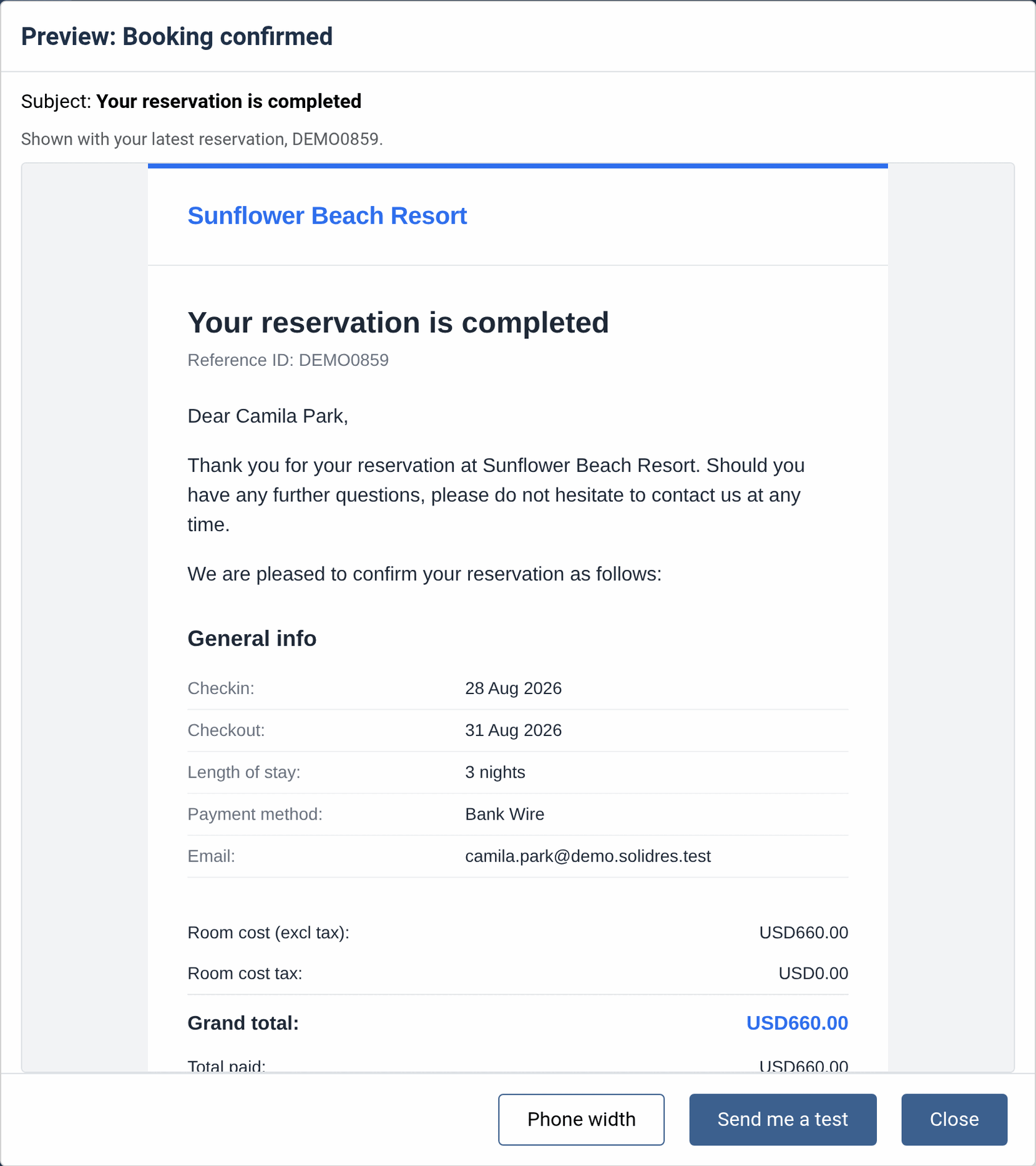
Send me a test sends the same email to your own address, the one of the account you are signed in with, with [Test] in front of the subject. Nothing is attached and nothing is written to the reservation, so you can send as many as you like. A test goes out through the site's mail settings, like the guest's email: if it does not arrive, see How Solidres sends outgoing emails.
Languages
On a multilingual site, each email has a tab per language, the site's default first. Each language has its own subject and message, and changing one language leaves the others on their own text. A guest receives the email in the language they booked in, or in the site's default language if that language is no longer installed.
The standard text is translated into every language Solidres comes in, so a language you do not change still reads well. The labels of the details, such as Grand total, come from Solidres's language files in every language: change them with System → Manage → Language Overrides. See How to build multilingual sites.
Back to the standard text
Reset to standard text, under each language, puts the standard subject and message back in the fields. Save to keep them. An email whose text is the standard one follows the standard text from then on, translations and later improvements included.
A text for one status
A status can carry its own text: open it in Solidres → Statuses and write its Email text. When a reservation changes to that status, the text replaces the message of Booking status changed (and of Booking confirmed when that status sends the confirmation). The Emails screen says so under Booking status changed, with a link to the statuses.
The Email text field has the same Insert a value menu. Texts written before Solidres 4.7.0 with the older names keep working as they are: {res_code} prints the reservation code as {{ reservation_code }} does.
| Older name | Same as |
|---|---|
{res_code} | {{ reservation_code }} |
{res_status} | {{ reservation_status }} |
{guest_number}, {adults_number}, {children_number} | {{ guests }}, {{ adults }}, {{ children }} |
{reservation_asset_name} | {{ property_name }} |
{customer_phonenumber} | {{ customer_phone }} |
The others, such as {checkin}, {grand_total} or {customer_email} | The value of the same name: {{ checkin }}, {{ grand_total }}, {{ customer_email }} |
The payment reminder
With the Invoice add-on, Solidres can remind guests of the balance due a few days before they arrive: Solidres Options → Invoice, Reminder email automation. Its Email subject and Email body take the same values, from the same Insert a value menu, and the reminder goes out in the guest's language. Older names such as {reservation_code} keep working. The reminder needs Invoice 2.2.0 or later to fill in the values of the menu.
When a text cannot be saved
Before saving, Solidres tries every subject and message with a sample reservation. A text it cannot send is not saved: the screen keeps what you typed and says which email and language, and why, with the line of the text. The usual cause is a value whose braces are not closed, such as {{ customer_name }, or an {% if %} without its {% endif %}. Correct it and save again. The Email text of a status and the payment reminder are checked the same way when you save them.
For developers: the full template
The wording sits inside a template that prints the rest of the email. Each email's template is a Twig file: the shell, mail.index.twig, draws the frame (the property's logo or name, the colours, the footer with the property's contact lines and social links, dark mode and right-to-left languages), and the email's body prints the title, {{ message|raw }} for the wording and the booking's details.
Editing a property's template
Signed in as the Super User, each email on the Emails screen ends with Edit the full template, which opens the body in a code editor for that property. The other administrators do not see the button. Under the editor, Preview and Send me a test work as on the main screen, in the language you choose.
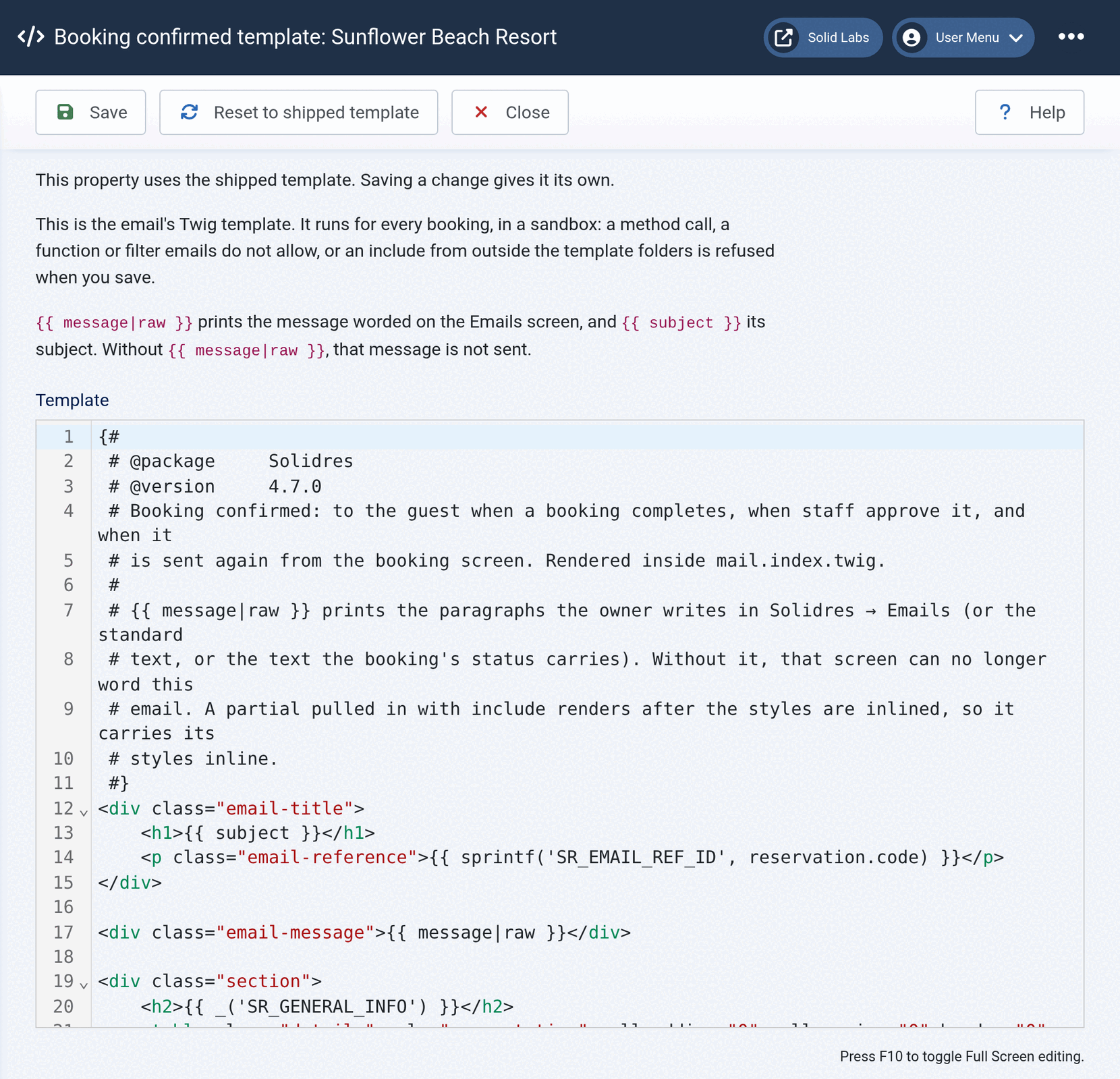
- Save tries the template with a sample reservation first, and refuses one that does not render, with Twig's reason and line. A template the same as the shipped one is stored as none, so the email keeps following the shipped template.
- Reset to shipped template puts the shipped body back, and Restore previous swaps back the body each save or reset replaced, so a reset can itself be undone.
- If an edited template uses something the sandbox refuses in a part the sample reservation did not reach, the guest still gets the email: Solidres sends it with the shipped template and writes the reason to its log.
- When a Solidres update changes the shipped body that a property's template started from, the editor says so and lists what changed, so you can carry the change over.
- Keep
{{ message|raw }}where the wording goes. A body without it takes the wording away from the Emails screen for that email, and the screen says so under the email's name.
What a template can do
An edited template runs for every booking, so it runs in Twig's sandbox. It can read the booking's data and print it, and nothing else: no method calls, and only these tags, filters and functions.
- Tags:
apply,block,for,if,include,set,with. - Filters:
abs,capitalize,date,default,e/escape,first,format,join,last,length,lower,nl2br,number_format,raw,replace,round,slice,split,striptags,title,trim,upper,url_encode. - Functions:
_('KEY')andsprintf('KEY', …)print a language string,plural('KEY', count)its plural form,currencyFormat(amount)an amount in the booking's currency,dateFormat(date, format)a date in the site's time zone; andmax,min,range. - Tests:
defined,divisible by,empty,even,iterable,none,null,odd,same as. includereads only from the template folders below.
Besides the values listed above, a body reads reservation (the booking, its rooms with their guests, extras and rate plan names, and its extras), property (name, address, contact lines and logo), costs (every amount the details print, already formatted), customer_fields and room_fields (the Custom Fields add-on's), payment_method, bankwire_instructions, sections (what add-ons such as Experience add to the email), language, direction, subject and message. The shipped bodies show how each is printed. The booking's token, the payment gateway's settings and the property's other settings are never in the data.
The shipped templates, and templates in your site template
| File | Shipped in |
|---|---|
mail.index.twig (the shell) | libraries/solidres/twig/templates/ |
booking/booking_confirmed.twig | |
booking/booking_received.twig | |
booking/booking_cancelled.twig | |
booking/booking_status_changed.twig | |
booking/message.twig | |
booking/booking_notification.twig (to the property) | |
invoice/invoice.twig | plugins/solidres/invoice/twig/templates/ |
feedback/feedback_request.twig | plugins/solidres/feedback/twig/templates/ |
Never edit the shipped files: an update replaces them. To change an email for every property, the Joomla way, copy the file into the default site template, under templates/<template>/html/com_solidres/emails/, keeping its folder: templates/<template>/html/com_solidres/emails/booking/booking_confirmed.twig. A copy of mail.index.twig there changes the frame of every email. Solidres then uses your copy for every property that has no template of its own on the Emails screen. Your copy follows the same rules as a template edited on the screen (What a template can do).
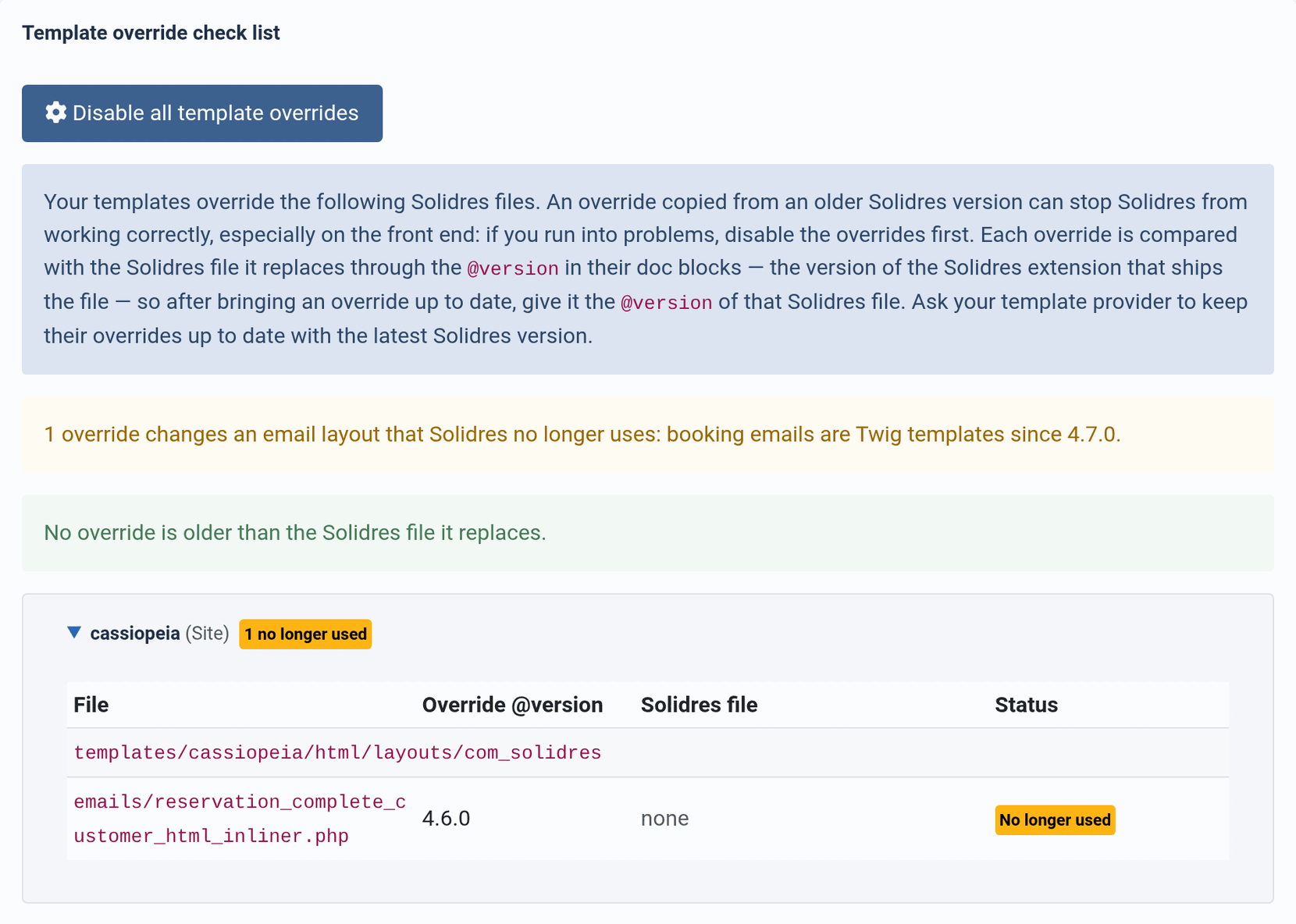
The System page (Solidres → System Info) lists the shipped templates under Important paths → Email templates, and its Template override check list compares your copies with the shipped files through the @version in their first comment, as it does for every Solidres layout.
Changed your emails before Solidres 4.7.0?
Up to Solidres 4.6, a site changed an email in one of two ways: with a language override of its wording, or with a copy of its PHP layout in the site template. Solidres 4.7.0 reads neither for the emails on this screen, so after the update those emails go out with the standard text and the new design until you move your change. Do it on a copy of your site before updating, or right after updating, before the next booking.
From a language override
The subjects and greetings of the guest's emails were language strings, which System → Manage → Language Overrides could change. The guest's emails no longer read the strings below: their wording is on the Emails screen. If your site overrode one of them, write your text on the Emails screen, in each language you overrode it in.
The Emails screen points them out. Under each email, a note names the overrides of its old strings that your site has (on a multilingual site, with their languages) and links to Language Overrides. A language leaves the note once the email has your own text in it, or once its overrides are deleted.
| Strings no longer read | |
|---|---|
| Booking confirmed | SR_EMAIL_RESERVATION_COMPLETE, SR_EMAIL_GREETING_NAME, SR_EMAIL_GREETING_TEXT, SR_EMAIL_CONFIRM_RESERVATION |
| Booking received | SR_EMAIL_BOOKING_APPROVAL_NOTICE, SR_EMAIL_GREETING_TEXT_APPROVAL |
| Booking cancelled | SR_EMAIL_RESERVATION_CANCELLED, SR_EMAIL_GREETING_TEXT_CANCELLED |
| Booking status changed | SR_RESERVATION_STATUS_CHANGE_EMAIL_SUBJECT, SR_RESERVATION_STATUS_CHANGE_EMAIL_CONTENT_HTML, SR_RESERVATION_STATUS_CHANGE_EMAIL_CONTENT |
| Message from the property | SR_RESERVATION_NOTE_FROM |
| Invoice | SR_INVOICE_EMAIL_SUBJECT, SR_EMAIL_INVOICE_GREETING_NAME, SR_EMAIL_INVOICE_NOTIFICATION_GREETING_TEXT |
| Review request | SR_EMAIL_REQUEST_FOR_FEEDBACK_SUBJECT, SR_EMAIL_REQUEST_FOR_FEEDBACK_GREETING_TEXT, _2 and _3 |
Once your text is written, delete the override unless something else still reads it: SR_EMAIL_GREETING_NAME, SR_EMAIL_GREETING_TEXT and SR_EMAIL_CONFIRM_RESERVATION still word the PDF voucher (the last one also the Hub's email about a commission), and SR_RESERVATION_STATUS_CHANGE_EMAIL_SUBJECT is still the subject of the email the property receives when a status changes, and of the emails about a tour's status. Overrides of the details' labels, such as SR_EMAIL_CHECKIN, keep working, and so do the strings of the email the property receives.
From a PHP layout override
A site changed the design of an email by copying its PHP layout to templates/<template>/html/layouts/com_solidres/emails/. Solidres 4.7.0 removes the layouts below. From the first email after the update, these emails are sent from their Twig templates, and a copy of their layouts is no longer read, so the change it made is no longer sent. The System page lists such a file as No longer used.
PHP layout of 4.6 (layouts/com_solidres/emails/) | Now |
|---|---|
reservation_complete_customer_html_inliner.php, reservation_complete_customer_html.php | booking/booking_confirmed.twig, booking_received.twig, booking_cancelled.twig, booking_status_changed.twig |
reservation_complete_owner_html_inliner.php, reservation_complete_owner_html.php | booking/booking_notification.twig |
reservation_note_notification_customer_html_inliner.php, reservation_note_notification_customer_html.php | booking/message.twig |
header.php, footer.php | mail.index.twig |
customer_fields.php, room_fields.php | Part of each body (customer_fields, room_fields) |
new_invoice_notification_customer_html_inliner.php, new_invoice_notification_customer_html.php (Invoice 2.2.0) | invoice/invoice.twig |
request_customer_feedback_html_inliner.php, request_customer_feedback_html.php (Feedback 2.2.0) | feedback/feedback_request.twig |
The voucher and invoice PDFs, the emails about tours booked through Experience and the review request of a tour, and the Hub's emails about commissions and approvals are still PHP layouts, and their overrides keep working.
To carry a change over:
- A change of wording, such as a greeting or a closing paragraph: write it on the Emails screen. Nothing else is needed, and it can differ per property and per language.
- A change of layout or design, such as a row added to the details or a different header: copy the shipped Twig file into your site template, as above, and make the change there. In Twig,
<?php echo $reservation->code; ?>becomes{{ reservation.code }},Text::_('SR_EMAIL_CHECKIN')becomes{{ _('SR_EMAIL_CHECKIN') }}, and a PHPiforforeachbecomes{% if %}or{% for %}. Styles go in the shell's<style>block, whose rules are written into every element of the email when it is built. - A change for one property only: make it with Edit the full template on that property's Emails screen.
- Send yourself a test of each email you changed, then delete the old PHP file from
html/layouts/com_solidres/emails/.