

Solidres 4.7.0 rebuilds the emails your guests receive about their booking. They get a new design that reads well on a phone, and you write their wording yourself, per property and per language, on a new Emails screen, with a preview and a test sent to your own inbox.
To make that possible, 4.7.0 replaces the files the emails were made from. If you, or the agency that built your site, changed the wording or the design of an email, that change stops when you update, and the email goes out with the standard text and the new design. This post explains how to tell whether your site is concerned, and how to carry your change over.
What your guests will see
Every email about a booking gets one design: a single column, your logo at the top (or your property's name when there is no logo), the main colour of your site template on links and buttons when it sets one, dark mode in the mail apps that offer it, and your address, phone, email and social links at the foot. Arabic, Hebrew and Persian read from right to left. Lines with nothing to show, such as a coupon nobody used or a deposit of zero, are left out.
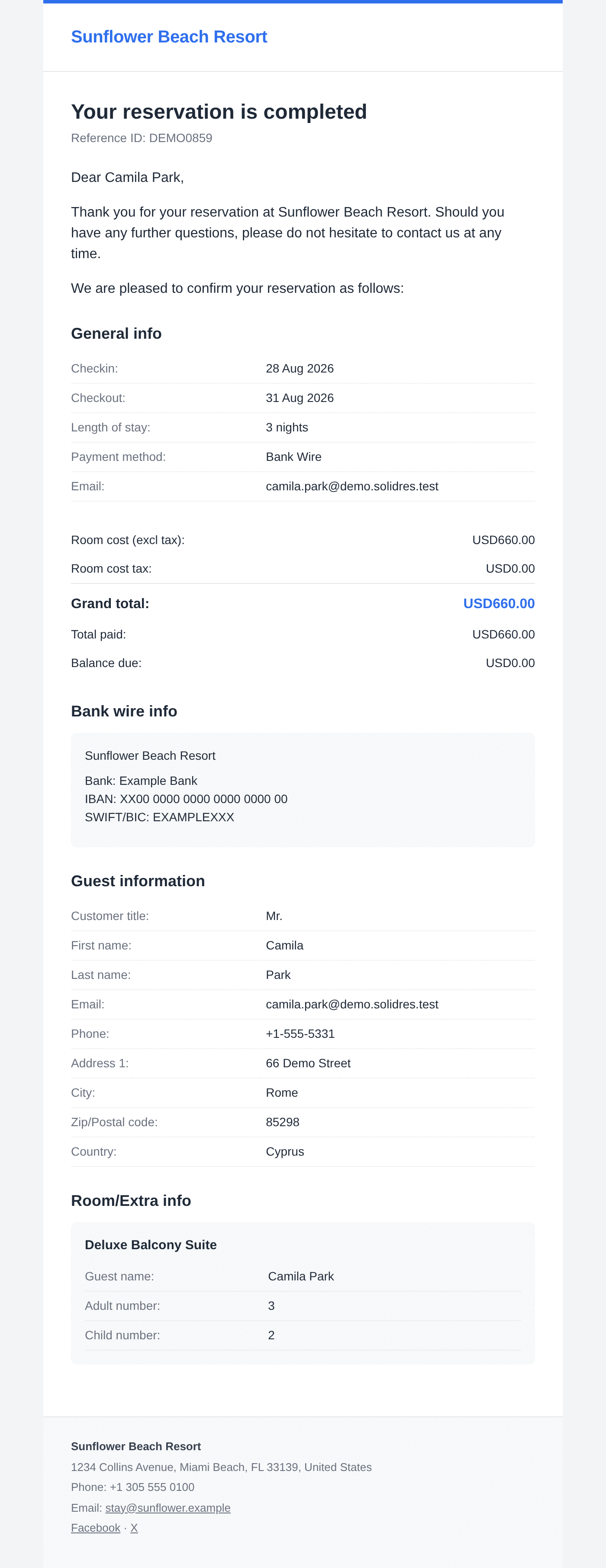
The new design covers the confirmation, the booking awaiting approval, the cancellation, the change of status, a message you send from a reservation and the email you receive about a new booking. With Invoice 2.2.0 and Feedback 2.2.0, the invoice email and the review request join them.
Word the emails yourself
In Solidres → Emails, each email has a subject and a message: the paragraphs above the booking's details. Write them in the editor you already use, and add the guest's name, the reservation code, the dates or the balance due from the Insert a value menu. Preview shows the email with your latest reservation, and Send me a test sends it to you. A multilingual site has a tab per language, and guests receive their emails in the language they booked in. Until you change an email, it uses the standard text, translated into every language Solidres comes in.
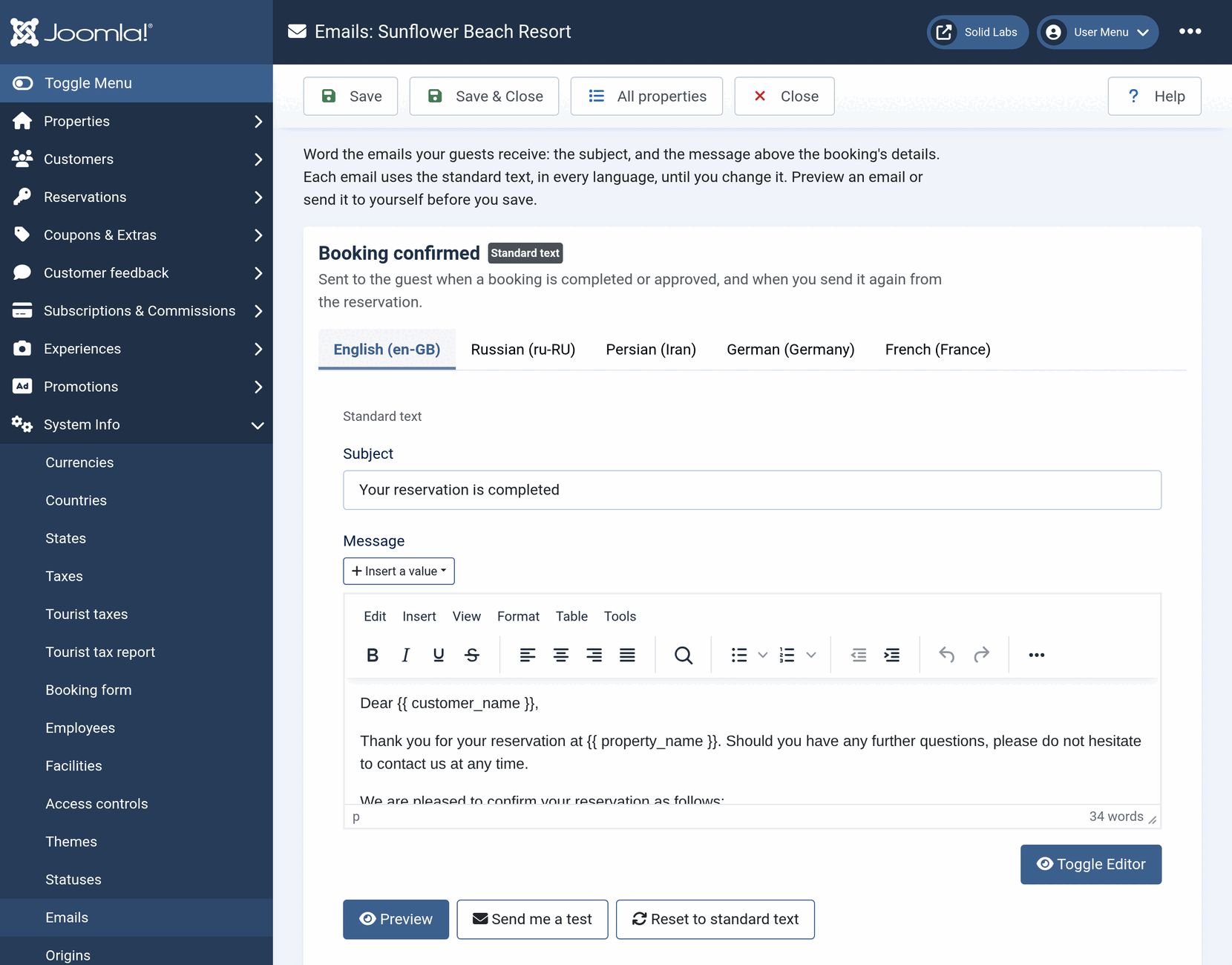
You do not need to be the Super User: anyone allowed to edit your properties can word the emails. Developers get the full template of each email, as a Twig file, behind the Super User's account. The documentation covers both: Wording the emails your guests receive.
Is your site concerned?
Only if an email was changed. Before you update, check these two places.
Language Overrides
Open System → Manage → Language Overrides, look at each language for both Site and Administrator, and search for SR_EMAIL and SR_RESERVATION. An override of a subject or a greeting, such as SR_EMAIL_RESERVATION_COMPLETE (Your reservation is completed) or SR_EMAIL_GREETING_TEXT (Thank you for your reservation at…), no longer changes the guest's email in 4.7.0. The documentation lists every string concerned, and after the update the Emails screen names each such override under its email until you write your own text. Overrides of the labels of the details, such as Grand total, keep working.
Template overrides
Look in your site template for the folder html/layouts/com_solidres/emails/. A PHP file in it is a copy of an email's layout, and 4.7.0 no longer reads it. Solidres's System page lists these files in its Template override check list; after the update, it marks them No longer used. The voucher and invoice PDFs, the emails about tours booked through Experience and the Hub's emails to partners are not concerned: their overrides keep working.
If neither place has anything, there is nothing to do. Your emails change to the new design, and their standard text says what it said before.
How to carry a change over
| What you changed | How | In 4.7.0 |
|---|---|---|
| A subject or a greeting | Language Overrides | Write it on the Emails screen, in each language; the screen names each such override until you do |
| The design or the details of an email | A PHP file in html/layouts/com_solidres/emails/ | Write the wording on the Emails screen; for the design, a developer copies the email's Twig template into html/com_solidres/emails/ and makes the change there |
| The text sent for one status | Statuses → Email text | Nothing: it keeps working, older names such as {res_code} included |
| The payment reminder | Solidres Options → Invoice | Nothing: it keeps working. Update Invoice to 2.2.0 |
| The labels, such as Grand total | Language Overrides | Nothing: they keep working |
The documentation walks through each case, with the old file and the template that replaces it: Changed your emails before Solidres 4.7.0?
So that no guest receives an email without your change, try the update on a copy of your site first and prepare the new texts and templates there, or update at a quiet time and move your changes before the next booking. Send yourself a test of each email you changed.
Update Invoice and Feedback with it
Invoice 2.2.0 and Feedback 2.2.0, released with Solidres 4.7.0, put the invoice email and the review request on the Emails screen, and they need Solidres 4.7.0: update Solidres first, then them. Until you do, they send their emails in the old design, and a payment reminder written with the new Insert a value menu goes out with the values as typed.