


Speedy Translate makes a Joomla 6 site multilingual. You translate articles, menus, modules and the rest in the language tabs it adds under each field of Joomla's own edit forms, and visitors get each page in their language, with translated URLs and hreflang tags. This article takes you from installing it to your first translated article, in about five minutes on a site that already has its content.
PREREQUISITES:
- Joomla 6.0 or later
- PHP 8.3 or later — the installer checks both and stops with a message if one is too old
- A MySQL or MariaDB database, through either of Joomla's drivers: MySQLi or MySQL (PDO). PostgreSQL is not supported
Lite and Pro
Speedy Translate comes in two editions: Lite, which is free, and Pro, a subscription. Both come from the same code and translate visitors' pages the same way. Pro installs over Lite and keeps your translations and settings; Lite installs over Pro and keeps your translations. These articles mark what needs Pro with PRO.
| Feature | Lite | Pro |
|---|---|---|
| Language tabs in Joomla's edit forms | Yes | Yes |
| Joomla core content, Solidres, Restaurant Management System | Yes | Yes |
| Translated, outdated and not translated status | Yes | Yes |
| Language switcher, hreflang, translated URLs | Yes | Yes |
| Setup check, import from Falang | Yes | Yes |
| Machine translation with Google, DeepL, Yandex | Yes | Yes |
| Search and override language strings | Yes | Yes |
| ChatGPT, Claude, Gemini; a provider per language; glossary | — | Yes |
| Bulk translation, coverage statistics, XLIFF | — | Yes |
| Smart Search in the visitor's language | — | Yes |
| HikaShop, J2Store, JEvents, K2, SP Page Builder, Creative Contact Form | — | Yes |
| Context translation, syntax checker, duplicate, missing and orphan keys, import and export of overrides | — | Yes |
| Support tickets | — | Unlimited |
Install
- Download the package: Speedy Translate Lite from the downloads page, or Speedy Translate Pro from My subscriptions on solidres.com.
- In your administrator, go to System → Install → Extensions and upload the zip file.
- Open Components → Speedy Translate.
One package installs everything:
| Extension | What it does |
|---|---|
| Speedy Translate component | The dashboard, the translation list, the options and the tools. |
| System - Speedy Translate | Adds the language tabs to edit forms and shows visitors each page in their language. The installer publishes it and runs it first. |
| Speedy Languages (site module) | The language switcher for visitors. |
| Speedy Languages (administrator module) | A language menu in the administrator's header, to change the administrator's own language. |
| Action Log - Speedy Translate | Records changes to the options and each machine translation in Joomla's User Actions Log. Enable it in System → Plugins if you want that record. |
| Task - Speedy Translate PRO | Runs bulk translation jobs from Joomla's scheduled tasks. |
| Smart Search - Speedy Translate PRO | Lets Smart Search find content in the visitor's language. |
Set up your multilingual site
The dashboard opens with Set up your multilingual site: the four things a multilingual Joomla site needs, each with a button that does it for you. Steps already done are marked (done), and the box goes away once all are done. Hide these steps puts it away sooner.
- Languages. A multilingual site needs at least two published content languages. Publish one you have with its Publish button, or pick one from Add language: Speedy Translate downloads its language pack from Joomla's language server, installs it and publishes it.
- Language Filter. Joomla's System - Language Filter plugin puts the language in each address (
/fr/…) and shows visitors the site in their language. Enable the Language Filter turns it on. If its hreflang links are off, Turn on hreflang links switches them on too. - Language switcher. Choose a position of your template (for Cassiopeia,
topbarworks well) and Publish the switcher. It is published on every page. - Translate your first article. Open the articles takes you to the article list. See below.
Below the setup, the dashboard groups its tools in two: Content translation, for what is stored in the database (articles, menus, modules and the records of other extensions), and Language strings, for the text of the language files.
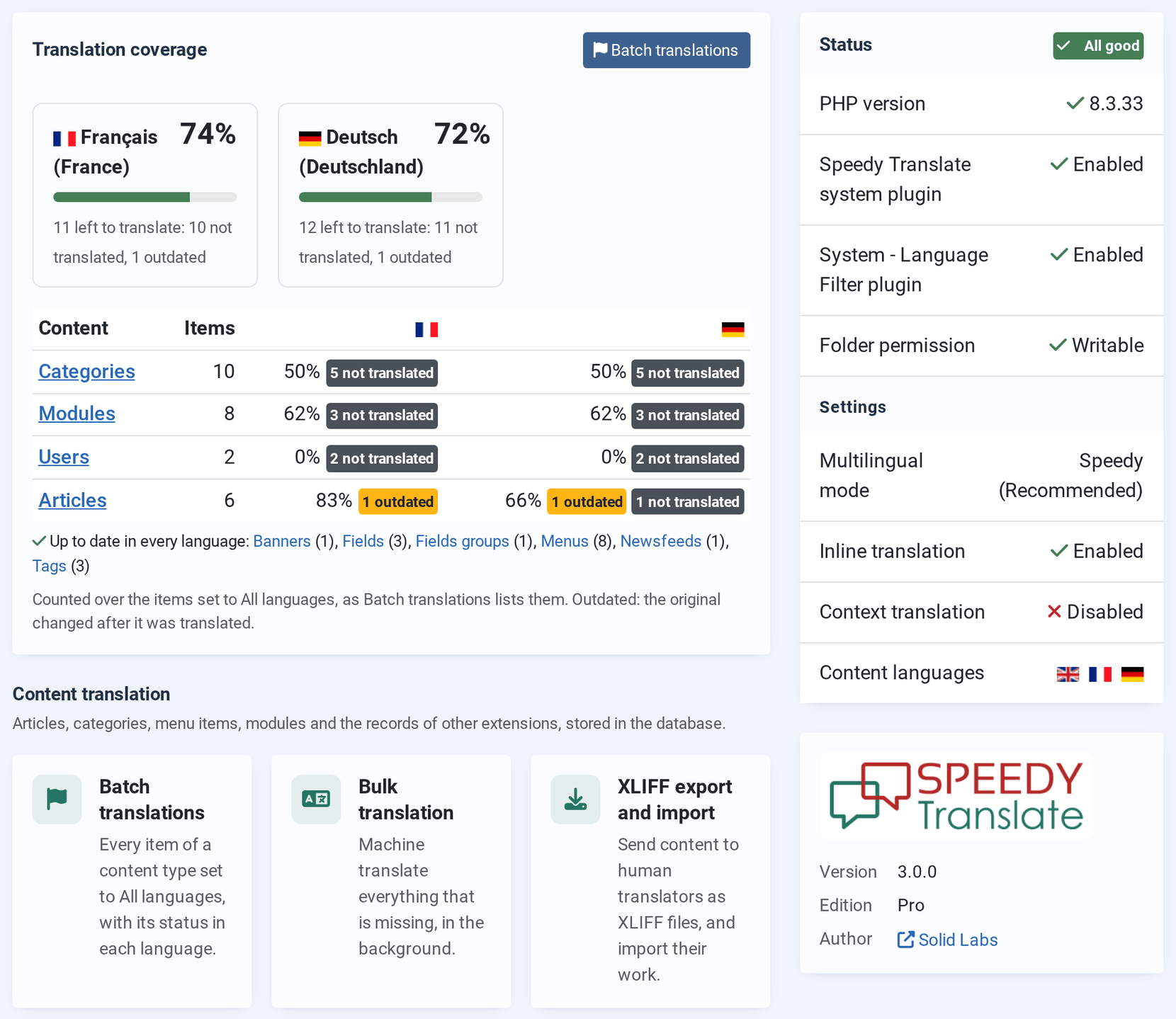
The dashboard of Speedy Translate Pro, once the setup is done. Lite shows the same page without the coverage and the Pro tools.
The Status card beside them checks the PHP version, the system plugin, the Language Filter and Speedy Translate's language folders, and says All good or how many problems it found. A plugin that is off links to Joomla's plugin manager, and a folder that cannot be written is named; a folder that does not exist yet is no problem, as Speedy Translate creates it when it first needs it. Under Settings, the card shows the multilingual mode, whether inline translation is on (and context translation, in Pro), and the content languages.
Translate your first article
- Open an article whose Language is All. In Speedy Translate's own mode, an item set to All is the one item every language shows, and it is the one you translate.
- Under the title, the alias, the text and the other fields, a row of flags appears: one per content language. Click the French flag under the title and type the French title. Do the same under the text.
- Save. Every language you typed in is saved with the article.
- Open the article on your site and choose French in the switcher.
That is the whole workflow. Translating content covers menus, modules, custom fields, the translation list and outdated translations.
The options
Open them with Options in the dashboard's toolbar.
General
| Option | What it does |
|---|---|
| Enable inline translation | Shows the language tabs under the fields of edit forms. On by default. |
| Exclude components | Components whose forms get no language tabs, separated by commas. By default com_plugins,com_config: the forms of plugins and of the options. |
| Access level | Only users with this access level see the language tabs. Empty: everyone who can edit the item. |
| Enable context translation PRO | Lets a user who can configure Speedy Translate (a Super User, typically) click interface text on the site or in the administrator to translate it. See Language strings. |
| Exclude keys PRO | Language strings that context translation leaves alone, one per line. Date formats are listed by default. |
| Multilingual mode | How translations are stored: Speedy (Recommended) or Joomla! Multilingual Associations. See Multilingual modes. |
| Download ID PRO | Your download ID from My subscriptions on solidres.com, for updates through Joomla's updater. Speedy Translate gives it to Joomla, which shows it as the Download Key in System → Update Sites. |
| Auto translation service | The machine translation provider, and below it the key for that provider. See Machine translation. |
Pro adds three tabs: Advanced (a provider and account per language), AI translation (the prompt and chunking for ChatGPT, Claude and Gemini) and Glossary. They are described in Machine translation. Permissions sets who may manage Speedy Translate; several tools (bulk translation, XLIFF, the Falang import, the syntax checker) need Configure ACL & Options on the component.
Updates, and moving between Lite and Pro
- Lite updates through System → Update → Extensions, with no account.
- Pro updates the same way once its Download ID is in the options. When the subscription ends, Pro keeps working; updates and support stop until you renew.
- Lite to Pro: install the Pro package over Lite. Your translations and settings stay.
- Pro to Lite: install the Lite package over Pro. It removes the Pro files and extensions and keeps your translations. Installing Pro again later brings the Pro tools back.
IMPORTANT Never uninstall to switch editions. Uninstalling Speedy Translate deletes its table of translations. Install one package over the other instead.
Upgrading from Speedy Translate 2
Download Pro 3.0 from My subscriptions on solidres.com and install it over 2.x in System → Install → Extensions: translations and settings stay, and the database changes run by themselves. Joomla's updater lists 3.0 on a 2.x site but usually cannot download it: version 2 never passed the download ID to Joomla, and solidres.com refuses a download without it. From 3.0 on, updates come through the updater. Without a subscription, install Speedy Translate Lite over 2.x instead: it is free and has the same security fixes. Back up first, as for any major update. Then check these:
- Yandex needs a new key. Speedy Translate now calls Yandex Cloud's Translate API. Keys of the old Yandex Translate API (starting
trnsl.1.1) stop working: create an API key for a Yandex Cloud service account with theai.translate.userrole. - The language switcher changed its markup. It renders real links now, and no longer uses jQuery. If your template overrides the switcher's layouts, redo the overrides from the new ones.
- Modules are translatable. New installs no longer exclude
com_modules. A site that saved its options keeps its own Exclude components: takecom_modulesout of it to translate modules. - The Falang mode is gone. A site that ran in it stays translated by Falang, with no language tabs in the edit forms, until you use Migrate from Falang on the dashboard: it copies Falang's translations and then switches the mode to Speedy. See Moving from Falang.
- ChatGPT's model is a text field now, in Pro. Check the model in Options → General.
- Custom code that calls Speedy Translate's translation endpoint must send Joomla's form token, and must run as a logged-in user who can edit content.
PHP 8.3 is now enough: version 2 needed 8.4.
NOTE If you have any questions, Pro subscribers can always contact us through our support ticket system, under the top menu Support → Tickets.