

Closed dates take rooms off sale for a stretch of days: for a renovation, for your own use, for a group you keep back, or for a booking taken somewhere Solidres does not see. Nobody can book a closed room on those dates, on your website or, with the Channel Manager, on your channels. Bookings already made stay as they are.
PREREQUISITES:
- The Closed Dates plugin, installed and enabled, available to Solidres subscribers. It is a download of its own, not part of the Solidres package.
- Solidres 4.8.0 and the Closed Dates plugin 2.0.6 for the names on this page. Before them the screen was called Limit bookings and the plugin Limit Booking; the fields and how they work are the same.
- Properties with published room types, and rooms added to them: you close rooms, not room types.
On this page:
- Closing rooms
- What a closed date does
- The list of closed dates
- Closed dates made elsewhere
- Where closed dates show
- Who can do what
- Troubleshooting
Closing rooms
- In the administrator, open Solidres → Reservations → Closed dates and click New. While the list is empty, the Close Dates button in the middle of the page does the same.
- Enter a Title: a short name for why the dates are closed, such as Renovation. It is required.
- Choose the Property.
- If you like, add a Description: a note for you and your staff. Guests never see it.
- Choose the Start date, the first closed date, and the End date, the last one.
- Under Rooms to close, click Refresh room list. The rooms of the property's published room types appear, grouped by room type.
- Tick the rooms to close. Select: All ticks every room that can be ticked, None clears them.
- Leave State on Published and click Save & Close.
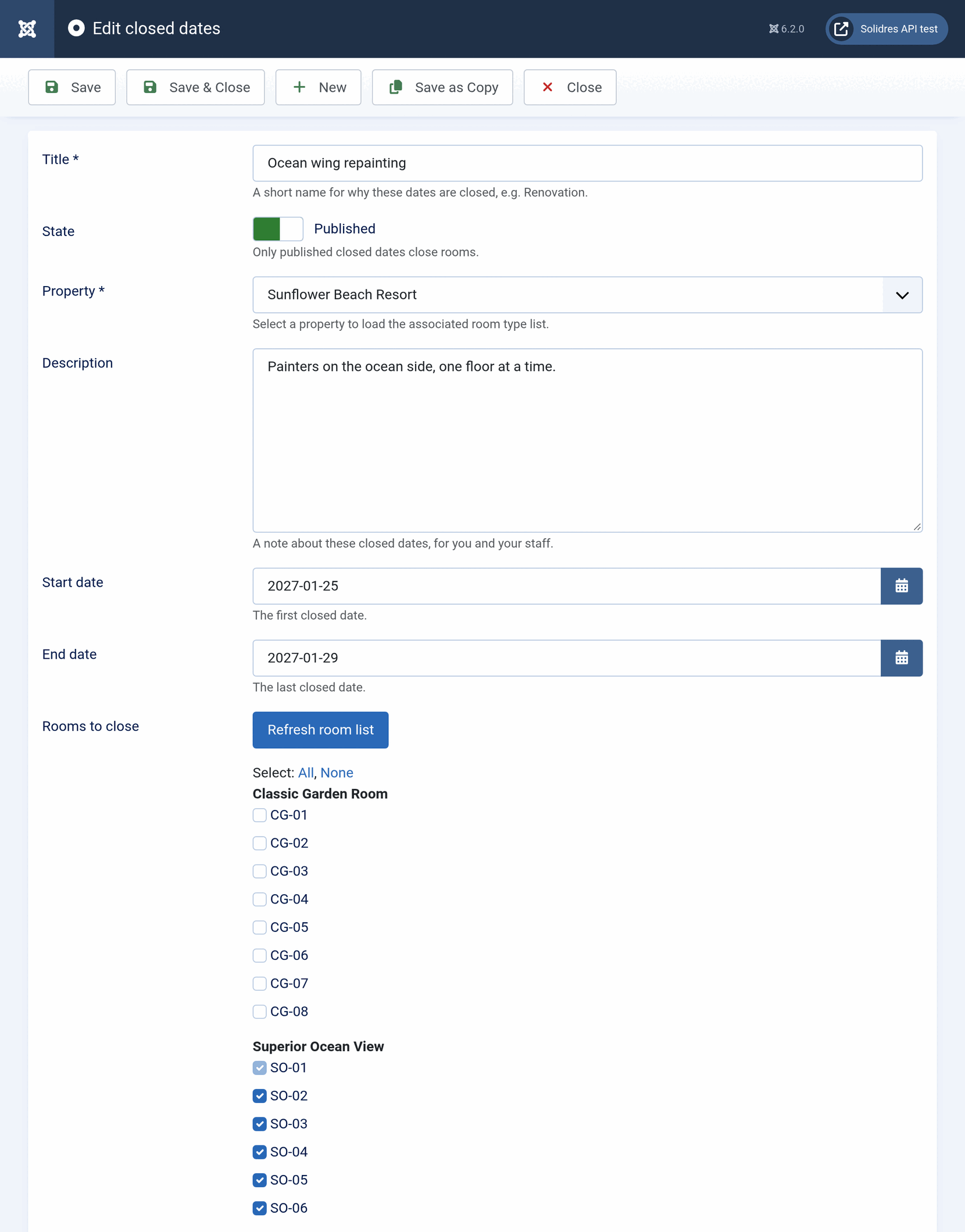
The room list reflects the property and the dates it was refreshed with. After changing either, click Refresh room list again: changing the property empties the list until you do, and new dates may free or take other rooms.
One set of closed dates belongs to one property. To close rooms in several properties, add closed dates for each.
What a closed date does
- Whole days, both ends included. A closed room cannot be booked for any night from the start date to the end date. A stay may still end on the start date, and the next one may begin the day after the end date. In a room type booked by the day rather than by the night, every day from the start date to the end date is closed.
- Only the ticked rooms. The other rooms of the same room type stay on sale, so the room type is still offered while one of its rooms is free. To take a whole room type off sale, tick all its rooms.
- Only while published. Unpublished closed dates close nothing. Unpublish them to reopen the rooms and keep the record; publish them again to close the rooms once more.
- Bookings come first. A room that already has a confirmed booking on those dates is shown ticked and greyed out under Rooms to close. Its booking takes it already: it is not closed, and the booking is not changed. Confirmed means the Confirmation reservation status of Solidres Options. Closed dates never cancel or move a booking.
- Only while the plugin is enabled. With the Closed Dates plugin disabled, every closed date is ignored and the rooms can be booked. Enabling it again closes them again.
The list of closed dates
Solidres → Reservations → Closed dates lists the closed dates of every property, with their Title, Status, Property, Start date and End date. Click a column's name to sort by it.
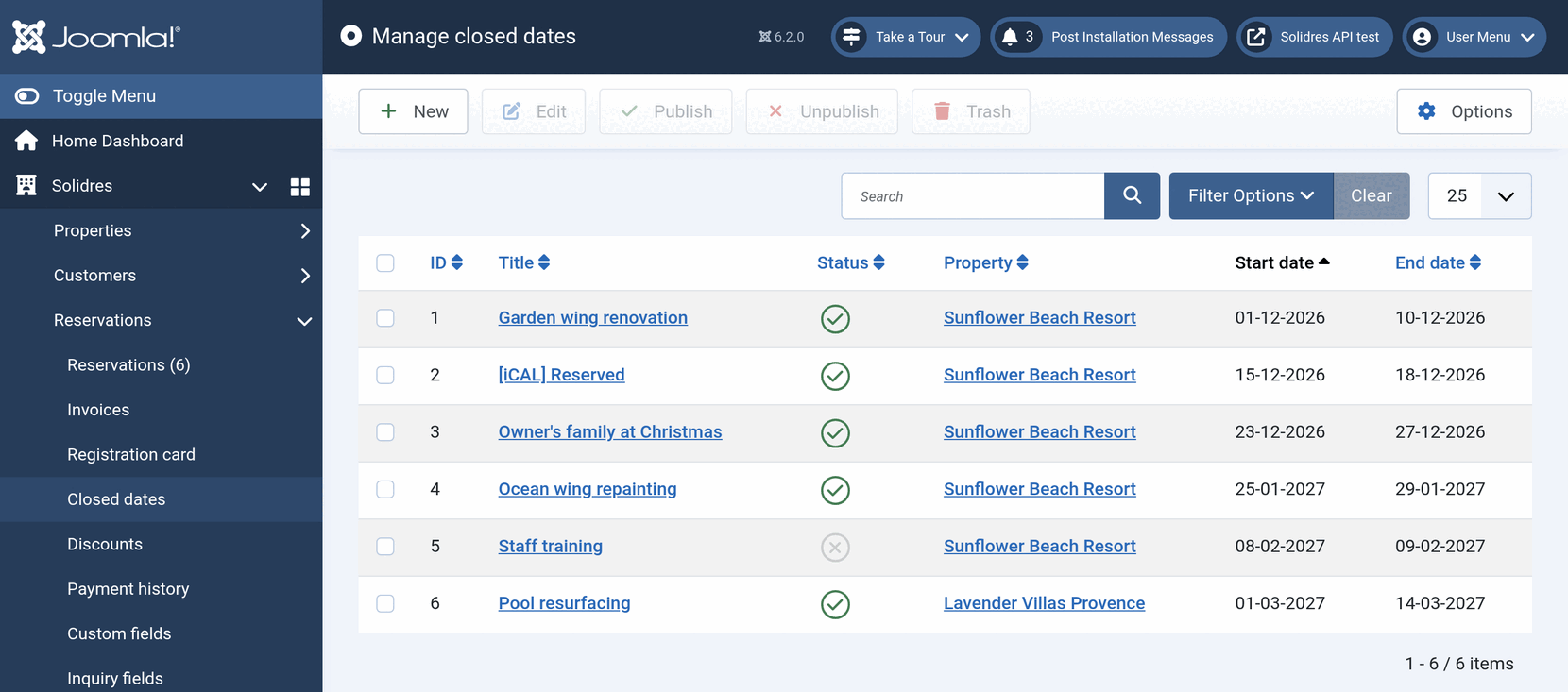
- Click a title to change the closed dates: their dates, their rooms or their state.
- Click the icon in the Status column, or tick rows and use Publish or Unpublish, to reopen rooms or close them again.
- Filter Options narrows the list to one property or one status; the search box finds titles.
- To delete closed dates, tick them and click Trash, then choose Trashed in Filter Options and click Empty trash. Closed dates that have ended do no harm: delete them when you like.
Closed dates made elsewhere
Three other tools add closed dates, and all of them appear in the same list:
- The Front Desk. Drag across the days and rooms on its calendar and choose Close dates. See Using the Front Desk.
- iCal imports. A calendar imported from another site, such as Airbnb, closes every room of the room type for the dates of each booking in it, as a calendar cannot say which room was booked. These closed dates have titles that start with
[iCAL]. Every import replaces them, so a change made to them is gone at the next one: change the booking on the site it came from. See How to configure iCal. - The Inventory grid of the Channel Manager. Lowering a room type's availability in Solidres → Inventory closes rooms through closed dates whose titles start with
[INVENTORY]. The grid changes only those. Other closed dates on the same days hold their rooms, and the grid cannot reopen them: edit them here instead.
Where closed dates show
- Your website does not offer a closed room on its dates. A room type whose rooms are all closed shows no availability for them.
- The Front Desk shows closed dates as blocks on the rooms' rows. Clicking a block's title opens it here.
- The iCal feed of each room type lists its published closed dates that have not ended yet, so the sites that read your feed close those dates too. The feed shows each one as Closed: followed by its title, so keep titles you would not mind those sites seeing.
- The Channel Manager lowers the availability it sends to your channels on the next sync, and raises it again when closed dates are unpublished or deleted. The sync log shows these as Closed dates sync.
- Reports count rooms as not available on their closed nights: Available room nights leaves them out.
Who can do what
Anyone who can open Solidres can manage closed dates. With the Solidres - ACL plugin enabled, it takes the Manage closed dates permission of Solidres → System Info → Access controls, which a Super User always has. Users without it do not see Closed dates in the menu, cannot open the screens, and cannot use the Front Desk's Close dates. Publishing, unpublishing and trashing also need the Edit State permission of Solidres Options, and emptying the trash its Delete permission.
With the Hub plugin, partners manage the closed dates of their own properties on the website, from Closed dates on the partner dashboard. Their screens have the same fields, list only their own properties, and with the ACL plugin need the same Manage closed dates permission for the partners' user group. Setting up partners is described in Initial configuration for Hub plugin.
Troubleshooting
- The Closed dates page says the Closed Dates plugin is not installed or enabled.
- Install the plugin, or enable Solidres - Closed Dates plugin in System → Manage → Plugins.
- Closed dates is missing from the Solidres menu.
- With the ACL plugin on, your user group needs Manage closed dates in Solidres → System Info → Access controls.
- Rooms to close lists no rooms.
- Choose the property and both dates, then click Refresh room list. If the list stays empty, the property has no published room types, or they have no rooms.
- A room is ticked and greyed out, and cannot be changed.
- It has a confirmed booking on those dates. Move or cancel the booking first if the room must be closed.
- Guests can still book a closed room.
- Check that the closed dates are published, that the room is ticked, and that the Closed Dates plugin is enabled. A stay that ends on the start date, or begins the day after the end date, does not touch a closed night.
- Closed dates whose titles start with
[iCAL]come back after being deleted, or lose a change. - The iCal import replaces them every time it runs. Change or cancel the booking on the site it came from.
- A channel still sells a closed room.
- The Channel Manager sends the change on its next scheduled sync. If it never arrives, see How to configure Solidres Channel Manager.