

The public booking API lets other software book your rooms the way a guest does on your website. A booking widget on a partner's website, a travel app or an AI assistant can see your properties and room types, find what is free for the guest's dates, get a price and make the booking, without an account on your site and without copying your pages.
It is priced and checked exactly as your own booking form prices and checks a booking, and a booking made through it is an ordinary booking on your site: the same emails, the same status, the same payment page. It stays off until you switch it on.
PREREQUISITES:
- Solidres 4.6.0 or later. Tours booked with a stay need Experience 2.4.0 or later.
- The Web Services - Solidres plugin enabled. Solidres enables it when it is installed.
- A Joomla administrator account that can change Solidres Options. CORS, Behind Load Balancer and URL rewriting are Joomla's Global Configuration, which needs a Super User.
On this page:
- What it does
- Turning it on
- What it shows, and what it never shows
- How a booking is made
- Payment methods
- Bookings in the administrator
- Rate limits
- A booking widget on another website (CORS)
- llms.txt for AI assistants
- Search engines: what a property page describes
- For developers
- Turning it off
- Troubleshooting
What it does
The API is a set of addresses under your site's /api/index.php/v1/solidres/public/. A program that calls them can:
- list the properties and room types your guests are shown;
- check what is free for given dates and guests, with each rate's price for the stay;
- list the extras that go with a room or the booking, and, with Experience, the tours a stay can include;
- get a quote: the price of the booking, worked out as your booking form works it out, with the payment methods the guest can choose;
- book that quote for a guest, with a payment method;
- let a guest look at their own booking with its code and their email address.
Who would use it:
- A booking widget on a partner's or a tourist office's website, which shows your rooms and books them without sending the guest to your site first.
- An AI assistant asked to find and book a room, which can read your prices and book instead of guessing from your pages. Your site tells assistants where the API is (see llms.txt).
- Your own apps, such as a mobile app or a second website for a single property, which can book without a copy of your booking form.
The API for staff, which reads and changes your data with a Joomla API token, is separate and is not affected by anything on this page.
Turning it on
- Go to Solidres → System → Configuration and open the Integrations tab.
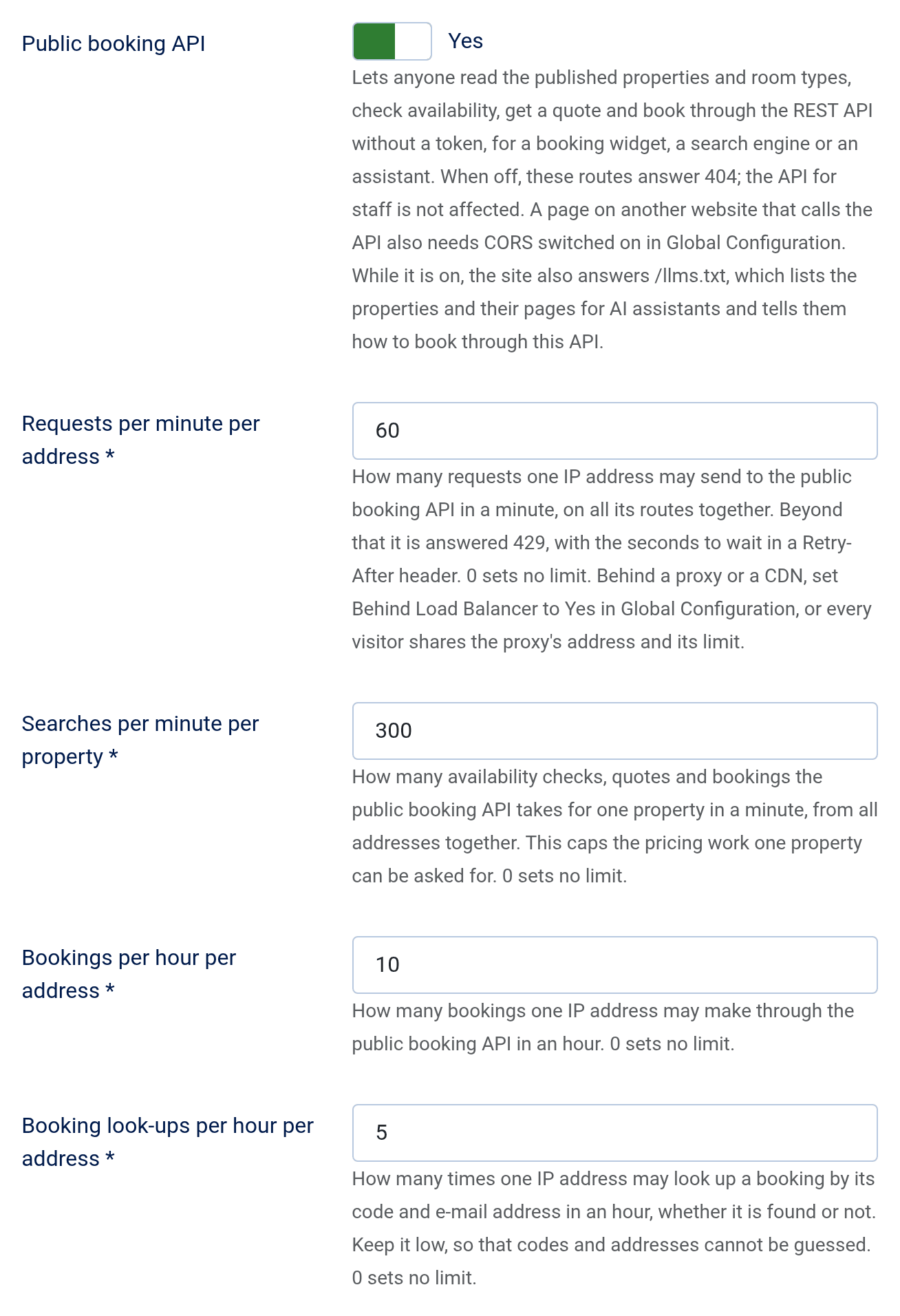
- Switch Public booking API to Yes. The four rate limits appear below it, with their defaults (see Rate limits).
- Click Save.
- Check it: open
https://www.example.com/api/index.php/v1/solidres/public/propertiesin your browser, with your site's address in place ofwww.example.com. You should see your published properties as text. While the API is off, the same address answers 404.
If the program that will call the API runs in a web page on another website, such as a booking widget, also switch on CORS (see A booking widget on another website). A program that runs on a server, or an assistant, needs nothing more.
What it shows, and what it never shows
The API shows what a visitor who is not logged in is shown on your website, and nothing else:
- Properties that are published and whose Access lets guests see them. A property for registered users only, or unpublished, is left out of the list and answers 404, as if it did not exist.
- For each property: its name, description, category, address, map position, phone, website, star rating, currency, photos, the address of its page on your site and, for a single property, its facilities and its policies (check-in and check-out times among them) as the property page shows them.
- Room types that are published: name, description, how many adults and children they take, children's age range, smoking, photos, amenities and the from price your property page shows.
- Extras that are published and on sale for the stay, with their prices.
- The countries and states your booking form offers a guest.
It never shows your guests, your other bookings, the property's email address, room numbers, your notes, coupons, or anything a plugin adds to the staff API. An add-on's settings and data stay out of it too, unless the add-on adds a public route of its own, as Experience does for tours.
The one thing about a booking it shows is a guest's own booking, to someone who gives both its code and the email address it was made with: the property, the dates, the status, the payment status, the rooms with their guests' names, the totals, what has been paid and what is still due, and the payment page while it can still be paid. Not the guest's address, phone, notes or payment details. A wrong email address and a code that does not exist get the same answer, so the look-up cannot be used to find out which codes exist, and it is limited to 5 tries an hour from one address by default.
How a booking is made
The API never accepts a price from the program that calls it. It books in two steps:
- The quote. The program sends the property, the dates, the rooms with their guests, the extras and, if the guest has one, a coupon code. Solidres prices it with the same code as your booking form: rates and rate plans, taxes, tourist tax, extras, coupons, deposit, and the surcharge or discount of each payment method. The quote holds that price for 30 minutes.
- The booking. The program sends the quote, the guest's details and the payment method. Solidres prices the booking again. If the price has changed in the meantime (you changed a rate, the coupon ran out, the room was taken), nothing is booked: the program gets the new quote to show the guest. A guest is never booked at a price they were not shown.
Once booked, it is handled as a booking made on your booking form:
- the same checks: availability, the room types' occupancy, minimum and maximum stays, the guest form's required fields, your custom fields;
- the same emails to the guest and to you, in the words you set on the Emails screen;
- the same status as a booking from your website gets, and, when the property is set to Approve each booking yourself, the booking waits for your approval as it does from your website;
- the same plugins, so an invoice, a channel manager or a feedback request follows as it does for any other booking;
- the same protection against a booking sent twice: a booking identical to one of the last five stored (same guest, same dates, same property, same amounts) is refused, not booked again.
What the API does not do:
- It does not create user accounts: no password is ever sent through it.
- It does not take card details, so payment methods that collect a card in your booking form cannot be chosen (see Payment methods).
- It does not take file uploads. A property with a required custom field of the file type cannot be booked through it; optional ones are left empty.
- It does not book early-arrival extras, which move the check-in date.
- It prices and books in the property's own currency only.
- It does not book a property where Guests must log in before booking is on. Such a property can still be listed and quoted.
- It does not quote or book a property whose Accept online bookings is off, on its Booking tab, from Solidres 4.8.0: the property page shows no booking form then either. Such a property is still listed, with its room types and availability. On Solidres 4.6.0 to 4.7.0 it can still be quoted and booked through the API, so update Solidres before turning the API on for a site with such a property.
- It shows no captcha. The quote and the rate limits take its place.
Payment methods
A quote lists the payment methods the property offers, each with its own total, and says which of them can be booked through the API.
| Payment method | Through the API | What happens |
|---|---|---|
| Pay later, Bank wire | Yes | The booking is completed at once, and the emails are sent, as when a guest chooses them on your booking form. |
| PayPal, and other gateways that take the guest to their own payment page | Yes | The booking is stored, waiting for payment, and the answer carries a link to your site's own payment page for it. The program sends the guest there; the page takes them to the gateway, and after paying they come back to your site's confirmation page, which completes the booking and sends the emails. |
| Stripe, Offline payment (card details), and other gateways that collect a card in your booking form | No | Listed in the quote as not available through the API, because the card is typed into your booking form, which the API does not use. |
| A gateway made by someone other than Solidres | No | Not offered: Solidres cannot know whether it works without your booking form. |
A property whose only payment methods collect a card can be quoted but not booked through the API. Add Pay later, Bank wire or a gateway with its own payment page to it if you want it bookable.
The payment page refuses a booking that is already paid or cancelled, or whose payment method is no longer available, and sends the guest to your home page with a message asking them to contact you. A guest who looks up their booking through the API gets the payment page again while the booking can still be paid.
Bookings in the administrator
A booking made through the API appears in Solidres → Reservations like any other, with the same origin as a booking made on your website (your default origin) and the same status. Nothing marks it as made through the API.
The visitor's address and browser that Solidres stores with a booking are, for these bookings, those of the program that called the API. When that program runs on a partner's server, they are the server's, not the guest's.
Rate limits
The API is open to anyone, so Solidres limits how much one client can ask of it. Each limit is on the Integrations tab, below Public booking API. 0 turns a limit off.
| Setting | Default | What it counts |
|---|---|---|
| Requests per minute per address | 60 | Every request one IP address sends to any part of the public booking API. |
| Searches per minute per property | 300 | Availability checks, quotes and bookings for one property, from every address together. Reading the property's details or its room types does not count, so search engines reading your properties do not use up what a booking widget needs. |
| Bookings per hour per address | 10 | Bookings from one IP address, whether they are made or refused. |
| Booking look-ups per hour per address | 5 | Guests' look-ups of a booking by its code and email address, found or not. Keep it low, so that codes and addresses cannot be guessed. |
A client gets the whole limit at once, then one more request each time a share of the period has passed: at 60 a minute, one a second. A request over a limit is not served. It is answered with the HTTP status 429 Too Many Requests and the number of seconds to wait, which the program can show the guest or wait out by itself. Nothing is booked or charged.
When to change them:
- A partner calls the API from their server, for all their visitors: every request then comes from the server's one address. Raise Requests per minute per address and Bookings per hour per address for them, or set 0, since the limits cannot be raised for one address only.
- Your site is behind a proxy or a CDN, such as Cloudflare: every request then arrives from the proxy's address, and all your visitors share one limit. Switch on Behind Load Balancer in System → Global Configuration → Server. Joomla then takes the visitor's address from the
X-Forwarded-Forheader, so the proxy must replace that header with the address it saw rather than add to it; otherwise a client can name any address it likes and the per-address limits stop holding. Ask your host if you are unsure. - A property's searches are refused while its rooms are much in demand: raise Searches per minute per property. At the defaults, five clients at their own limit use up a property's minute.
Solidres can note each client it stops in Joomla's log, once each time it stops them, with the address and the limit. To keep these notes, go to System → Global Configuration → Logging and switch on Log Almost Everything, or under Custom logging enter solidres.api in Log Categories. The notes go to your site's log folder. Addresses are not kept in the database: the counts are stored under a scrambled name.
A booking widget on another website (CORS)
A web browser lets a page call another site only when that site allows it. This is called CORS. A booking widget on a partner's website, which calls your API from the visitor's browser, therefore needs your permission; a program that calls from a server, an app or an assistant does not.
- Go to System → Global Configuration, tab Server, section Web Services.
- Switch Enable CORS to Yes.
- In Access-Control-Allow-Origin, enter the address of the website the widget runs on, such as
https://www.partner-site.com, or keep*to allow every website. - Keep
Content-Typein Access-Control-Allow-Headers, as Joomla's default does: the browser asks for it before it sends a quote or a booking. - Click Save.
This setting is Joomla's and covers all of your site's Web Services, the staff API included. The staff API still needs a token, which a partner's page does not have, so allowing an origin lets it book as a guest and nothing more.
llms.txt for AI assistants
Your site also answers /llms.txt, a short text page written for AI assistants, following llmstxt.org. It holds:
- your site's name, and your site's meta description from Global Configuration (or a sentence about your properties when there is none);
- each property your visitors are shown, up to 500, with a link to its page, its city and country, and its meta description or the start of its description;
- while the public booking API is on, how to book through it: quote, then book within 30 minutes, the payment link and the rate limits, and where the API's description for developers is.
From Solidres 4.8.0 the page is there whether or not the public booking API is on, and says nothing of the API while it is off. Before 4.8.0 it answered only while the API was on.
It is written from your properties on each visit, so it is always up to date, with nothing to save or regenerate. Its fixed wording is English, since software reads it, not guests; the names and descriptions are yours. Search engines are asked not to list the page itself.
- It needs Use URL Rewriting on, in System → Global Configuration → Site, with the
.htaccessfile (or your web server's equivalent) in place. Without URL rewriting, your site has nollms.txt, and nothing else is affected. - It is served by the System - Solidres plugin, which must be enabled, as it is for Solidres to work at all.
- Your own file wins. If you place a file named
llms.txtin your site's root folder, the web server serves yours and Solidres never writes over it. Delete it to have Solidres's again. - On a site in a subfolder, the page is at the subfolder's address, such as
https://www.example.com/hotel/llms.txt.
Search engines: what a property page describes
Since Solidres 4.6.0, every property page also describes the property to search engines and assistants in schema.org markup, which they read without having to understand the page. This is not tied to the public booking API: it is on whether the API is on or off, and needs no setting.
The markup describes the property (a hotel, or a vacation rental for apartment properties) with its address, photos, star rating and, with the Feedback add-on, its guests' review score, its room types with their photos, occupancy, beds, size and amenities, the check-in and check-out times read from its policies, its facilities, and a link to book on its page unless the property takes no online bookings. While the page shows the starting prices of its rooms, before a guest picks dates and when rates are shown, each room type also carries those prices, the same ones the page prints.
To check what a page says, paste its address into Google's Rich Results Test or the Schema Markup Validator. Keep check-in and check-out times in the policies as times, such as From 14:00, so they can be read.
For developers
Give the developer of a widget, an app or an assistant these two addresses:
- The Solidres API reference, section Public booking: every address, a walk from search to booking with
curl, the errors, the rate limits and CORS. - Your own site's description of its public API, with your site as the server, ready to import into an API client or to hand to an AI tool:
https://www.example.com/api/index.php/v1/solidres/public/openapi.
Turning it off
Switch Public booking API to No and save. At once, every public address answers 404, a quote that was not booked yet can no longer be booked, and /llms.txt no longer mentions the API (before Solidres 4.8.0 it answered 404 too). Bookings already made stay as they are, and a guest who was sent to the payment page for one can still pay it. The staff API and the property pages' markup are not affected.
Troubleshooting
Every public address answers 404
- Check that Public booking API is on and saved.
- Check that the Web Services - Solidres plugin is enabled, in System → Manage → Plugins.
- Check that your host or a security extension does not block the
/api/folder. Joomla's staff API, if you use it, would be blocked too.
A property or a room type is missing
The API lists only published properties whose Access is for guests, and published room types. A property for registered users only does not appear and answers 404, as does a property that does not exist: the API does not tell the two apart.
A payment method is missing, or a property cannot be booked
See Payment methods: a method that collects a card in your booking form cannot be chosen through the API. A property also cannot be booked when Guests must log in before booking is on, when it has a required custom field of the file type, or, from Solidres 4.8.0, when its Accept online bookings is off.
The price changed between the quote and the booking
That is the API protecting the guest: the booking is refused with the new quote, which the program should show the guest before booking again. It happens when a rate, a coupon or the room's availability changes in the 30 minutes a quote holds, or when the quote is older than that.
Requests are refused with 429
A rate limit was reached. If every visitor is refused at once, your site is probably behind a proxy or CDN without Behind Load Balancer on: see Rate limits. If one partner's widget is refused, their server may be sending all their visitors' requests from one address.
A widget on another website gets no answer, but the address works in a browser
CORS is off, or the widget's website is not the one in Access-Control-Allow-Origin: see A booking widget on another website. The browser's console names the blocked request.
/llms.txt answers 404
- Use URL Rewriting is off. Before Solidres 4.8.0, the page also answers 404 while the public booking API is off.
- The System - Solidres plugin is disabled.
- If it shows something you did not expect, there may be an
llms.txtfile of your own in the site's root folder, which is served instead.