

Not every guest pays when they book. With Pay Later, the guest books now and pays at your property, usually on arrival. With Bank Wire, the guest pays by bank transfer to your account, and the email they receive gives them your bank details. Neither takes money online, and neither asks for a card: the booking is a request, Pending, until you confirm it, and until then it does not hold its room (see After the booking).
PREREQUISITES:
- Solidres 4.8.0 or later. Both methods are part of Solidres: there is nothing to install.
Which to offer
- Pay Later suits guests who pay at the desk, by card or in cash. A new property has it on, so your first test booking can go through. You learn whether the guest comes only when they arrive.
- Bank Wire suits a deposit or a stay booked well ahead, and guests in countries where transfers are usual. You record the payment once the money is in your account.
- To be paid when the guest books, offer PayPal or Stripe too: see How to setup PayPal plugin and How to set up the Stripe plugin. Guests choose from every method you turn on.
Turn them on
- Open Properties → Properties and click your property.
- Open the Pricing & payments tab. Under Payment methods, each method has a panel: click its name to open it.
- In the Bank Wire panel:
- Enable Bank Wire: Yes.
- Account name: the name your bank account is held in, such as your company's.
- Account details: what a guest needs to make the transfer: the bank's name, the IBAN or account number, the BIC or SWIFT code. Put each on its own line.
- In the Pay Later panel, Enable Pay Later is Yes on a new property. Set it to No if you want every guest to pay another way.
- In either panel, Frontend message: one or two sentences guests read before they choose, such as Pay by bank transfer within 5 days of booking; put your booking number in the transfer.
- Choose the Default: the method already chosen when the guest reaches the payment. Set it to Yes on one method only.
- Drag the panels by their name to set the order guests see them in.
- Click Save & Close.
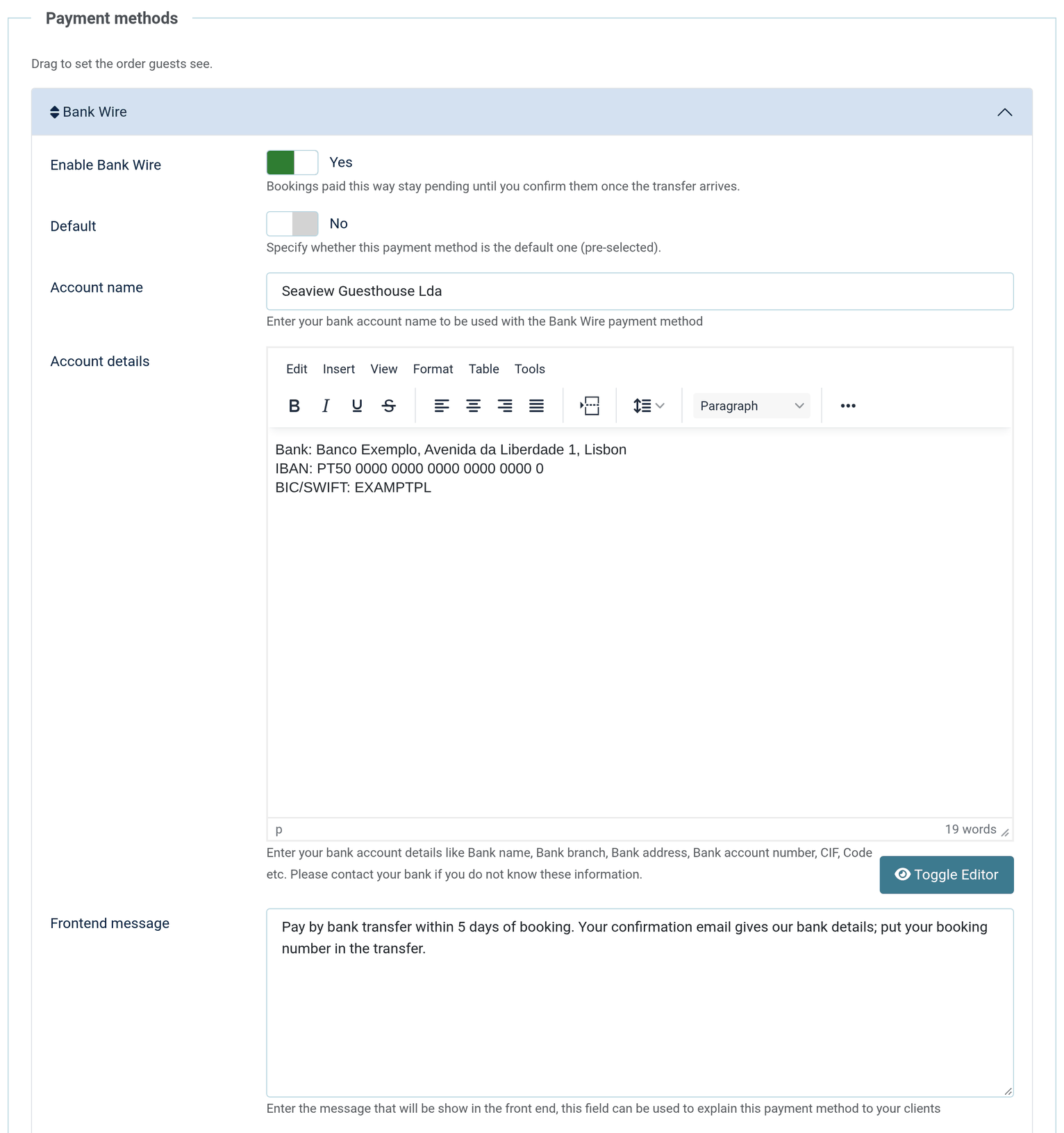
Two more settings in each panel:
- Base rate adjustment and its value: a surcharge (+, or + [%] for a percentage) or a discount (-, - [%]) for guests who choose this method, such as 3% off for a bank transfer. The booking shows it as Bank Wire surcharge or Bank Wire discount.
- Visibility: Frontend + Backend offers the method to guests and to you; Frontend to guests only; Backend only when you enter a booking yourself, such as Pay Later for a guest who telephones.
What the guest sees
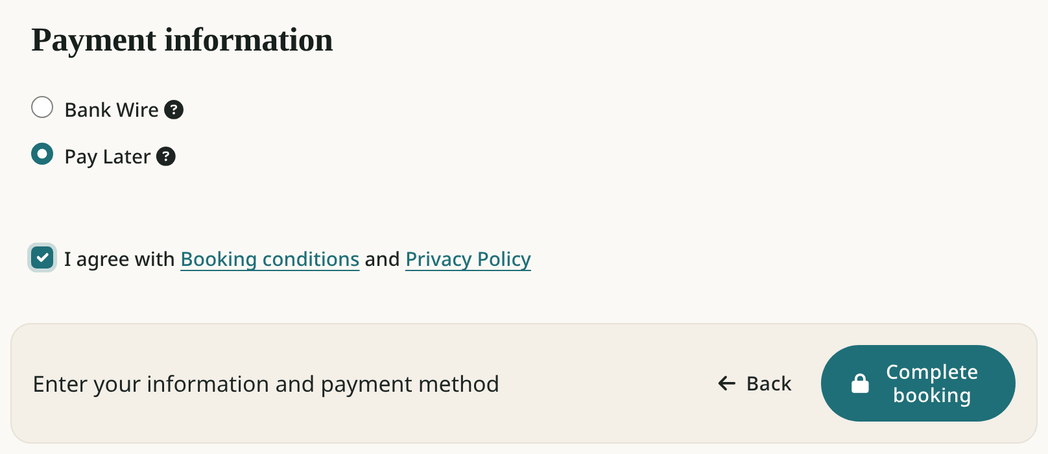
On Complete your booking, under Payment information, the guest chooses a method. The question mark beside each name shows its Frontend message. The guest clicks Complete booking, and the page thanks them: their reservation request, with its number, has been sent to you, and a confirmation email will follow once it is approved.
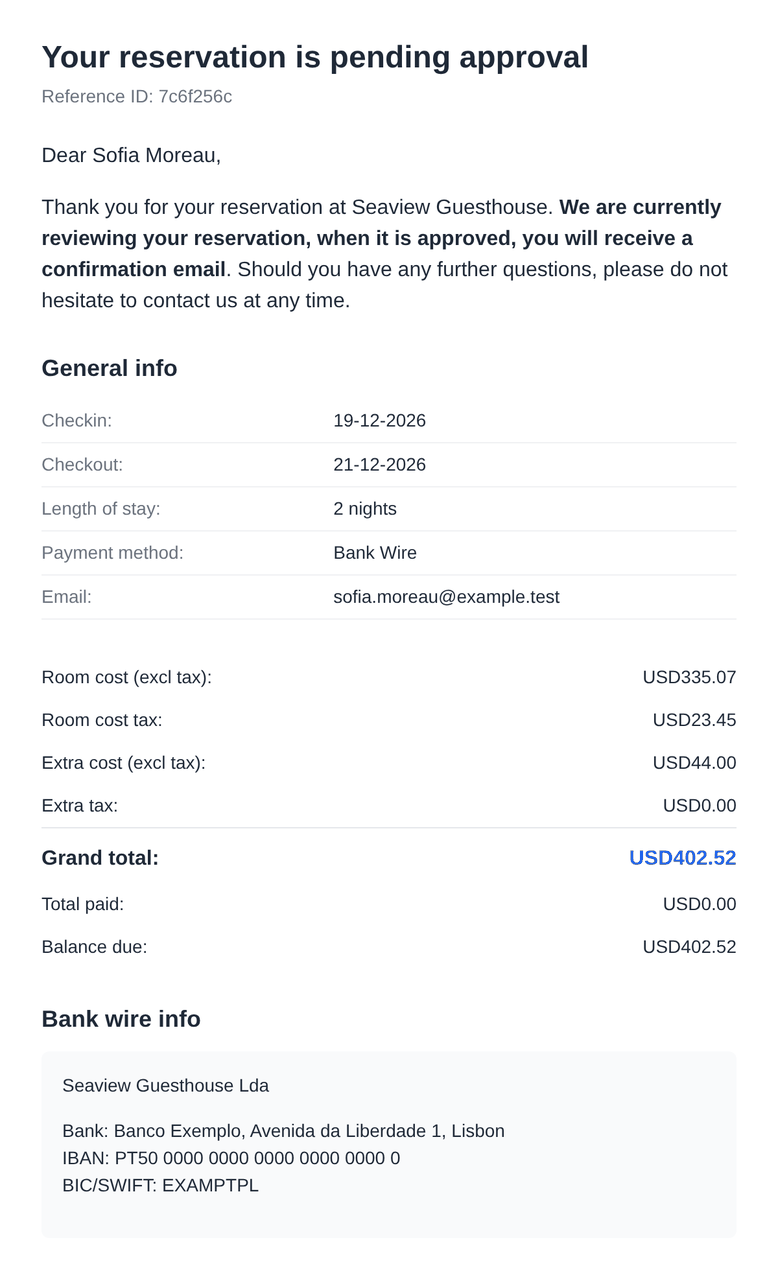
The email Your reservation is pending approval follows, and New reservation comes to you. For Bank Wire, both have a Bank wire info part with your Account name and Account details, under the grand total and the Balance due; the website itself does not show them. The guest is sent Your reservation is completed, the confirmation, when you confirm the booking (see After the booking). The emails' words are yours to change in Emails (see Wording the emails your guests receive).
After the booking
A booking paid either way is Pending, with the payment status Unpaid. A pending booking does not hold its room. Until you confirm it, your website still offers the room for those dates, and another guest can book it. So confirm each booking as soon as you accept it, without waiting for the money:
- Open the booking: Reservations → Reservations, then its code.
- Beside Status, click Pending, choose Confirmed and click Save. The guest is sent Your reservation is completed, with the whole booking.
That email goes when Confirmed is among the Reservation statuses trigger emails, in Solidres Options → Reservation. Solidres Self-hosted, and every site we run for you, has Confirmed and Cancelled there. On a site you installed yourself the list starts empty, and a confirmed guest is sent nothing until you add them.
If another booking for the same dates was confirmed first in the room this one was given, Solidres confirms it in another free room of the same type, and moves a booking that has not begun to another room of its type, on the same dates, when that is what frees one. A note on each booking that changes room says so. Only when no room of the type is free for the whole stay does it answer It is not possible to confirm this reservation because there is no availability for your reserved rooms.: on the Front Desk you can move the booking to another room type or other dates (see Moving a booking), or tell the guest.
If your property asks for a deposit, the guest sees it before booking, but neither method takes it: the whole amount is due until you record what arrives. If you turned on the payment reminder (see Invoices and payment history), it goes to Bank Wire guests too, before they arrive, with your bank details. Pay Later guests, who pay at your property, are not sent it.
When the transfer reaches your account, or the guest pays at the desk, record the payment on the booking's Payment history tab: see Record a payment. Total paid and Balance due follow, and once the whole grand total is paid, the payment status becomes Completed.
A transfer that never comes, or a guest who does not arrive: no booking is cancelled by itself. Write to the guest, and if nothing comes, set the status to Cancelled, which frees the room. See Managing reservations.
Holding a card
Pay Later takes no card, so nothing secures the booking against a guest who does not come. To be paid when the guest books, or a deposit, offer Stripe or PayPal: the guest types the card into their forms, and your website never sees the number. Solidres no longer takes card numbers on your own pages, and a site we run for you has no such method.
Your staff
Your staff change these settings with the property: it takes the right Manage property, which Property staff have on Solidres Self-hosted and on a site we run for you. Recording a payment takes your own account; your staff cannot. See Change what they may see.
For site builders
- Tours of the Experience add-on have their own Pay Later and Bank Wire, set on each tour, with their own account details. Both are on for a new tour.
- The public booking API offers both methods; a booking made through it is Pending like any other, and the API answers
confirmed: falseuntil you confirm it. - A quick booking on the Front Desk is recorded with Pay Later.
- With the Hub, partners set both methods for their own properties while Front end payment method manage is Yes in Solidres' Options, on the Hub tab.